Google Business Profile Optimisation: The Complete Guide to Ranking on Google Maps
Google Business Profile optimisation, field by field. Most profiles we audit are a third complete. This is the exact process we use to take a local business from invisible on Google Maps to the top three, with Google's own rules for every step.

By Boostable · 13 September 2026
Websites and SEO for Australian businesses · ~13 min read

We've audited a lot of Google Maps listings over the years. The pattern never changes. A business owner comes to us frustrated. They've been told they're "doing SEO". They've paid someone to build a website. They have a Google Maps listing, sort of. Then we open the Google Business Profile and find it's about 30% complete. The categories are wrong. The services section is empty. The description says nothing about what they do or where. There are five reviews, collected over ten years.
If the information doesn't exist, Google can't find it. That's the whole of Google Business Profile optimisation in one sentence, and this guide is the long version: every field that matters, what Google itself says about each one, and the order we do them in when we take a business from invisible on Google Maps to the top three for its area.
- Local SEO with Boostable: the profile, the pages and the reviews, done for you.
- Google reviews for business: how they actually drive sales
- Why your Google Maps content stays invisible
- How to check your Google Maps listing
Why the profile matters more than your website
When someone searches "electrician Caulfield" or "tree removal Wollongong", they are not browsing for next month. They need help now, and Google shows them a map with three businesses before it shows them a single website. That box is where the decision gets made. Most people ring one of the three and never scroll further.
We tell every client the same thing: you're better off with a complete Google Business Profile and a plain website than a beautiful website and a half-built profile. The profile is what puts you in the box. Google's own page on local ranking says results are based on three things, relevance, distance and prominence, and it names reviews directly: "more reviews and positive ratings can help your business's local ranking."[1] Almost every field in this guide feeds one of those three.
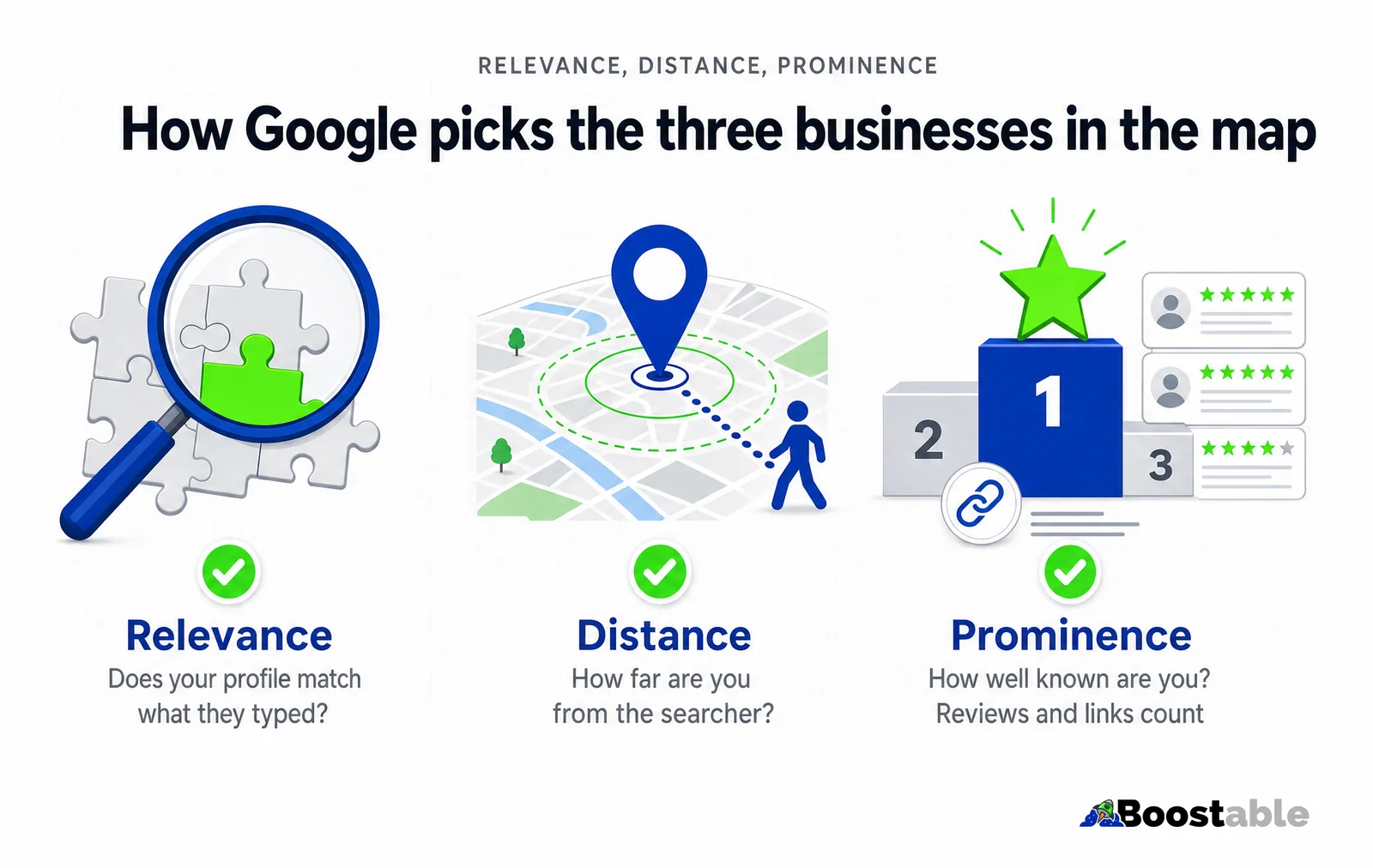
Relevance
How well your profile matches what was typed. Categories, services and description do this job. If you don't say you do it, you don't rank for it.
Distance
How far you are from the searcher. You can't change it, but you can set the service areas that tell Google where you actually work.
Prominence
How well known you are. Google says it counts reviews and links from other sites. This is the factor you build over time.[1]
The invisible fields that decide your visible ranking
Most owners think the profile is their address and phone number. Those are the fields the customer sees. The fields that decide whether the customer sees you at all are further down the form, and most businesses have never opened them.
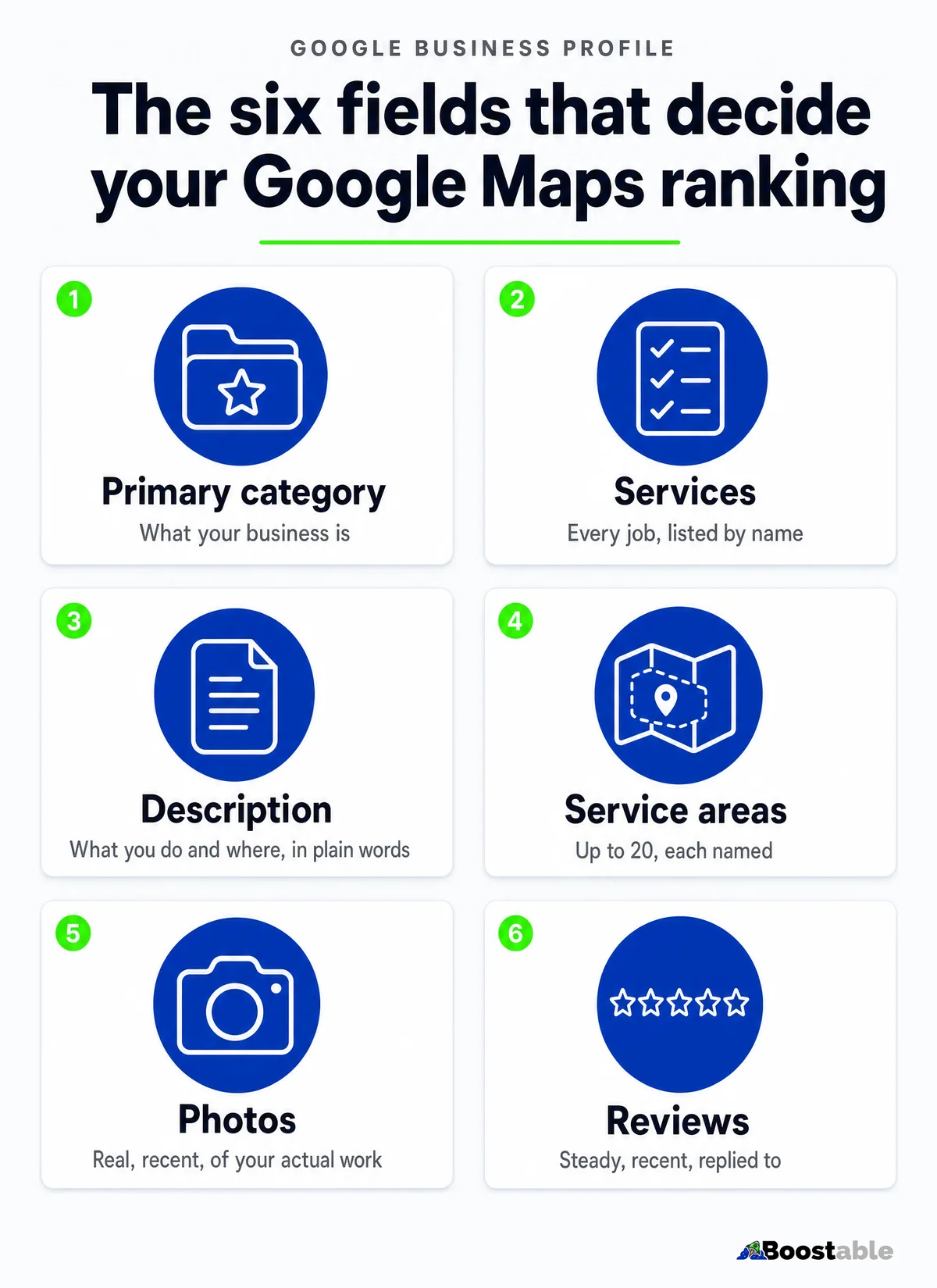
Categories: the foundation of everything
Your primary category tells Google what your business is. It carries more weight than any other single field, because it decides which searches you're even eligible for. A plumber with "Plumber" as the primary category is in the running for plumbing searches. A plumber with "Contractor" is in the running for very little.
Google's guidance is short and worth quoting: "Use as few categories as possible to describe your overall core business," and "choose categories that are as specific as possible, but representative."[2] It also warns not to "use categories solely as keywords or to describe attributes."[2] That last line is the mistake we see most. Owners pile in ten categories hoping to catch everything, and a competitor with two focused categories outranks them, because Google no longer knows what they're best at.
The approach that works: one precise primary category, then every secondary category that genuinely describes a service you offer. No more.
Services: the list Google reads
Under each category, Google lets you list the individual services you offer, each with a short description. When we audit a profile, this section is almost always empty. Owners don't know it exists, or don't think it matters. It matters. It's the clearest way to tell Google that "hot water repairs" and "blocked drains" and "gas fitting" are all things you do, in the words a customer would search.
Fill every service field, and write each description as if the customer will read it, because they will. For a business with many services across several areas, this alone is a competitive advantage most rivals won't bother to build.
Description: what you do and where, in plain words
The business description is your one chance to say, in a paragraph, what you do, who for, and where. Not "quality workmanship at competitive prices". What you actually do, the areas you cover, how long you've been at it, and what a customer can expect. Google reads it for relevance. Customers read it for confidence.
Service areas: tell Google where you actually work
If you go to the customer rather than the customer coming to you, this field is the difference between ranking across your region and ranking only on your own street. Google's rules are specific: "If you don't serve customers at your business address, remove your address from your Business Profile." You can set "up to 20 service areas," and "the boundaries of your overall area shouldn't be more than about 2 hours of driving time from where your business is based."[3]
Name the suburbs and towns, not just the region. "North-east Victoria" is not a service area anyone searches for. Wangaratta, Benalla and Beechworth are.
| Field | What we usually find | What it should be |
|---|---|---|
| Primary category | Broad, or wrong | The most specific category for the core business[2] |
| Secondary categories | None, or ten | Only the ones that genuinely apply |
| Services | Empty | Every service, each with a written description |
| Description | Two lines of slogans | What you do, for whom, where, how long, what to expect |
| Service areas | One city, or none | Every suburb and town, up to 20, within two hours[3] |
| Photos | A logo and a stock image | Real, recent photos of the work and the team[4] |
| Reviews | A handful, years old | A steady stream, every one replied to |
| Posts | None | A short update most weeks[5] |
The two-tier system: what you say, and what customers say
Think of Google Business Profile optimisation in two tiers.
Tier one is telling Google everything you do. Categories, services, description, service areas. If you don't mention a service, you won't appear for it, even with a thousand five-star reviews. You have to be in the running first.
Tier two is what customers say about you. Reviews are part of prominence in Google's own words,[1] and they're the thing the customer reads when deciding between the three businesses in the box. Pew Research found 82% of adults at least sometimes read online reviews before a first-time purchase.[8] When customers mention a specific service and suburb in a review, Google can use that to match you to searches for exactly that, and you'll see those snippets highlighted in the results.
Anything you say about yourself is useful. Anything a customer says about you is worth ten times more.
The review system that actually works
We've helped businesses go from five reviews in ten years to fifty in three months. The system is simple; most businesses just don't have one. Two pieces.
The card. When you arrive at a job, hand over your business card. On the back is a QR code that opens your Google review box. "Here's my card. If you want to leave us a review after we're done, scan the back." That plants the idea before the work starts, and Google itself says to "ask customers to visit a Google link or scan a QR code."[7] We make that card for free on our review card page.
The text. When the job's done and the customer thanks you, send the review link by SMS. A thank-you, a hint about what to mention, a heads-up that Google may ask them to log in, and the link. When they tap it, the review box opens with the stars ready. Every point of friction removed.
What you can't do is pay for it. Google says offering incentives "in exchange for customers to post reviews, change reviews, or remove negative reviews is considered fake and misleading content and is strictly prohibited."[7] The ACCC is blunter still: "It's against the law for a business to create fake or misleading reviews or to arrange for others to do so," and it has fined Service Seeking $600,000 and HealthEngine $2.9 million over review conduct.[10] Ask everyone, the same way, and let them say what they like.
One of our Sydney clients, Fridges R Us, started at zero and passed 700 Google reviews inside two years on exactly this system. Their story is in its own post: from zero to 740 reviews in 18 months.
"Tamhas from Bootable Digital Marketing is, friendly, easy to work with and always responds to calls and messages in a timely manner. A webpage and google map work was done for me and I am very happy with the results."
Rhett Aquilina ★★★★★ Verified Google review
Want the review card and the text set up for your business? It's free.
Get the free review systemThe content that makes it all work
Everything above depends on one thing: having the right words. The gap between what's in your head and what's on your profile and website is where most businesses lose.
You explain your business brilliantly in person. You know exactly how you help, what goes wrong in your trade and how you stop it happening, what a customer should know before they hire anyone. None of it is written down. So we start every client relationship with an interview: what do you do that makes a difference, how do you avoid the common problems, what should customers know before hiring someone in your field, where exactly do you work. The conversation pulls out details you take for granted, and those details become the services list, the description, the location pages and the answers on your website. Anyone can say they're the best. Details prove it.
Location pages: ranking across every suburb
If you serve twenty, fifty or a hundred suburbs, the profile alone won't carry you across all of them. You need a page on your website for each area you genuinely work in: what you do there, how far you travel, what a job there tends to involve, reviews from customers nearby.
The trap is duplication. If every location page says the same thing with the suburb name swapped, Google won't index most of them, and the ones it does index won't rank. Each page has to be genuinely about that place. When Google sees a page dedicated to exactly what someone searched for, and that page ranks well in the ordinary results, it often puts the business in the map box for that suburb as well.
This is what moved ASET Tree Removal in Sydney from ranking in one corner of the city to appearing across most of the west. Between March 2026, the last full month before their suburb-page programme went on, and August 2026, their Google impressions rose 86% and clicks 33%, measured in Google Search Console.
The ongoing work: posts and photos
Setting the profile up properly is the foundation. Keeping it fed is what holds the top three against the competitors who set theirs up next month.
Posts. Your profile has a mini blog. Google says posts let you "share announcements, offers, updates, and event details directly with your customers on Search and Maps," and they show in the Updates and Overview tabs on mobile.[5] A short post about a finished job, with a photo, most weeks, is enough. Posts older than six months are archived,[5] so a profile that stops posting soon looks like a business that stopped trading.
Photos. When you're on a job, take photos and add them to the profile from the Maps app. Google's guideline is that a photo "should be in focus and well lit, and have no significant alterations or excessive use of filters," in other words "the image should represent reality."[4] Real photos of real work, added regularly, tell the customer you're active and tell Google the same. Stock images and AI pictures do neither, and Google can tell.
✓ Hold the top three
- One specific primary category, secondaries that genuinely apply
- Every service listed and described
- Service areas named, suburb by suburb
- A review after every job, every one replied to
- A real photo and a short post most weeks
✗ Fall out of it
- Ten categories chosen as keywords
- Services section empty, description a slogan
- One service area, or an address they don't serve from
- Reviews that stopped in 2023, none answered
- A logo, a stock photo, and no post since the profile was claimed
What happens if you don't do this
AI search is now part of how people find local businesses. Assistants like Google's AI Overviews and ChatGPT read the same profile data, the same reviews and the same website pages to decide who to recommend. The information has to exist for an AI to find it, exactly as it has to exist for Google Maps. If you haven't written down what you do and where you do it, an assistant asked "who's a good electrician in Caulfield?" will name your competitor, because your competitor gave it something to read.
Competence without communication is invisible. It always was; now it's invisible in two places.
The economics of this work
Paid ads turn off the moment you stop paying. The profile and the pages don't. A service listed today ranks for as long as you offer it. A location page keeps working for years. A review is permanent. That's the difference between renting attention and owning something that keeps producing.
Google confirms the profile itself is free to add and claim.[6] The only cost is the work of filling it in properly and keeping it fed, and that's the part we do for clients who'd rather be on the tools.
- Open your Google Business Profile and check the primary category. Is it the most specific one for your core business?
- Open the services section. If it's empty, list every service and write a sentence for each.
- Set every suburb and town you work in as a service area, up to 20.
- Check the date of your newest review. If it's more than a month old, set up the card and the text today.
- Add three real photos from recent jobs, and post one short update.
"Very helpfull and knowledgeable in the process of creating my business website and google pages."
Daniel Benedetti ★★★★★ Verified Google review
None of this is a trick. It's a free form, filled in completely, in the customer's words, and kept alive with reviews, photos and posts. Most of your competitors have done a third of it. Do all of it, and the map box is yours to lose.