Why Is My Business Not Showing on Google Maps? The Back-Room Fields Nobody Fills
Why is my business not showing on Google Maps? Nine times out of ten, half the profile is empty: categories, services, service areas, descriptions. Google reads those fields to decide if you're in the running. Here's what it reads, in Google's own words, and how to fill it.

By Boostable · 13 September 2026
Websites and SEO for Australian businesses · ~12 min read


Most small businesses can't work out why nobody finds them on Google Maps. They've got reviews. They've got a listing. They've been trading for years. Still invisible. If you've asked "why is my business not showing on Google Maps?", the answer is almost always dull and fixable: half the fields on the profile are empty, and Google reads every one of them before it decides whether you're in the running.
This post is about the back room of the profile, the fields customers never see and Google never stops reading. What each one does, in Google's own words, why two identical-looking listings rank differently, how reviews fit in once the fields are filled, and the three jobs to do this week.
- Local SEO with Boostable: the profile, the suburb pages and the reviews, done for you.
- Google Business Profile optimisation: the complete guide
- Check your Google Maps listing
- List your service areas and get found on Google
The hidden fields nobody fills
Google Maps is not just a business name and a phone number. Behind the front page there's a whole back room: categories, services, a description for each service, service areas, attributes, hours, products. Most of it doesn't show on the front of the listing. The customer never sees it. But Google reads it to decide whether you match a search.
Google says so directly. "Businesses with complete and accurate info are more likely to show up in local search results," and "if your business info isn't accurate, your Business Profile might not show up for relevant searches in your area."[1] If you never listed "tree removal" in your services, you're not competing for "tree removal near me." You're not even in the line-up. If you don't tell Google you do it, Google assumes you don't.
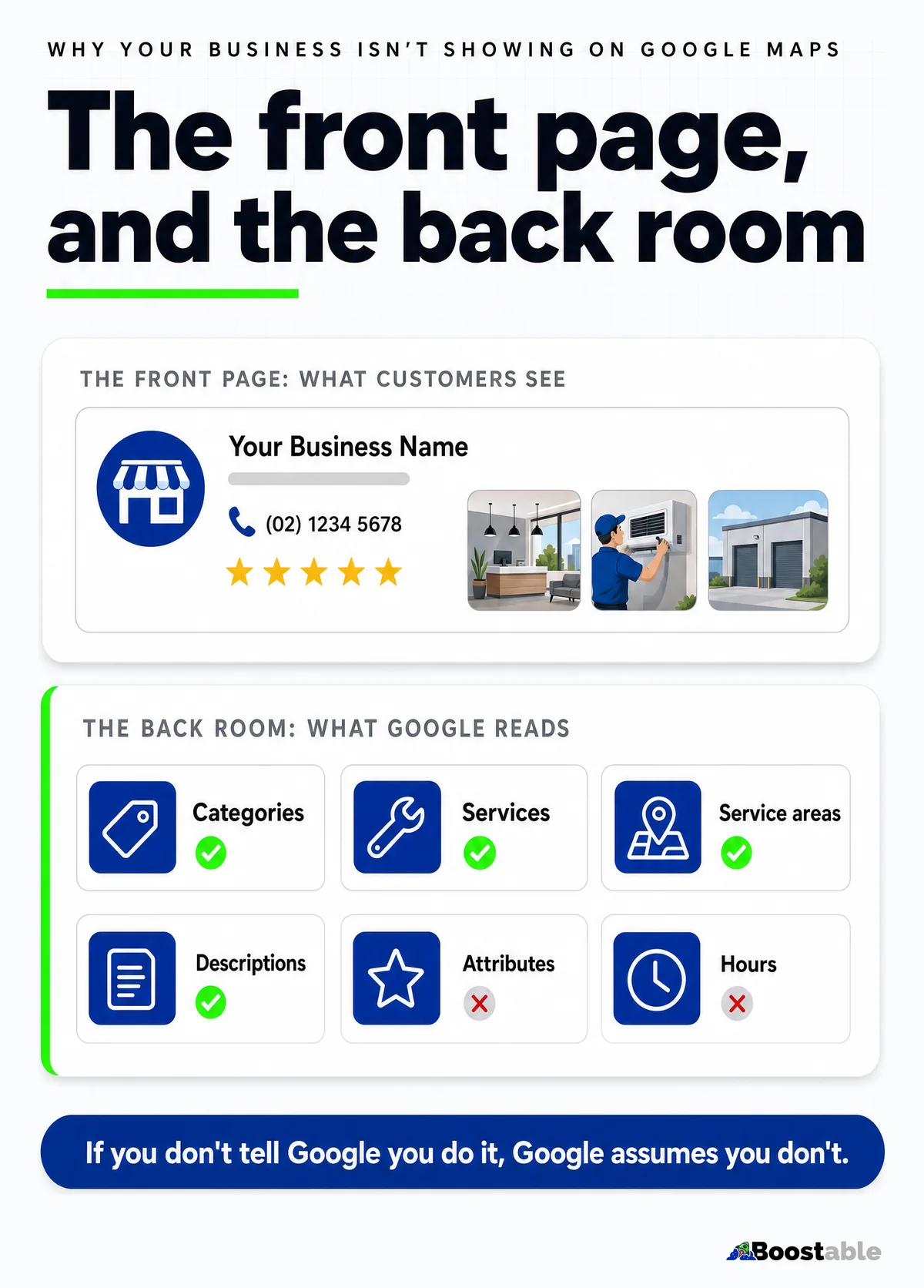
| Field | What Google uses it for | What we usually find |
|---|---|---|
| Primary category | Which searches you're eligible for at all[2] | Too broad, or wrong |
| Secondary categories | The other things you genuinely do[2] | None, or ten chosen as keywords |
| Services | Matching specific searches to specific jobs | Empty, or one line |
| Service descriptions | The words Google matches against what people type | Blank |
| Service areas | Where you show up, up to 20 areas[3] | One city, or none |
| Business description | What you do, for whom, where[1] | "Quality service" |
| Attributes and hours | Filters and the "open now" test | Half set, years out of date |
How to see your own back room
Open your Google Business Profile as the owner (search your business name while signed in, or open Maps and tap your listing) and go through the edit screens one by one: business information, categories, services, service areas, hours, attributes. Don't look at the front of the listing; you already know what that looks like. Look at what's blank. Most owners doing this for the first time find the services tab has one entry, the service areas were never set, and the description is a sentence they wrote in 2019. That's the audit, and it takes ten minutes.
Then do the same for the three businesses in the map box for your main search. You can't see their back room, but you can see its effects: the services their listing shows, the categories under their name, the suburbs their reviews mention. Whatever they've filled in that you haven't is the gap.
The two-tier visibility hierarchy
Local search works in two tiers. Miss the first and the second can't help you.
Tier one: eligibility. Tell Google everything you do. Every service, every suburb, every category, every detail. Much of it lives in fields you never look at. Google's own description of relevance is "how well a Business Profile matches what someone is searching for," and its advice is to "provide complete and detailed business info" so it can "better understand your business and match it to relevant searches."[1] If you don't fill them in, you're out of the game before it starts.
Tier two: ranking. Once you're eligible, what customers say in reviews decides where you land. Google pulls review snippets that match the search. A customer who writes "they removed a dead gum in Wyndham Vale on a Saturday" is worth more to you than any self-description, because Google's most basic relevance signal is content that "contains the same keywords as your search query."[5] Prominence, in Google's words, is "based on info like how many websites link to your business and how many reviews you have."[1]
You control tier one entirely. Tier two needs good work and a simple system to ask for reviews. Both or neither.
Relevance
Tier one. Categories, services, description, the words on the profile. You write all of it.[1]
Distance
Neither tier; you can't move. But the service areas you set tell Google where you actually work.[3]
Prominence
Tier two. Reviews, ratings, the sites that link to you. Customers write most of it, if you ask.[1]
Why identical listings rank differently
Two tree services, same town, both with about 80 reviews. One is in the map box for most of the searches that matter and the other isn't. Look at the profiles side by side: same front page, roughly the same photos, the same stars. Then open the back room. One has the right primary category, forty service fields filled in with a sentence each, and every town in the district set as a service area. The other has a broad category, three services and no service areas.
That's the whole difference. Not luck, not magic, not something Google is doing to one of them. One business did the work most businesses don't. Same reviews, different fields.
We see the same pattern in every trade. Two physios in the same street: one listed under a specific category with every treatment named, the other under a general one with "physiotherapy" as its only service. Two cafes: one with hours, attributes and a menu filled in, the other with a name and a phone number. The customer looking at the front of either listing can't tell them apart. Google, reading the back room, can.
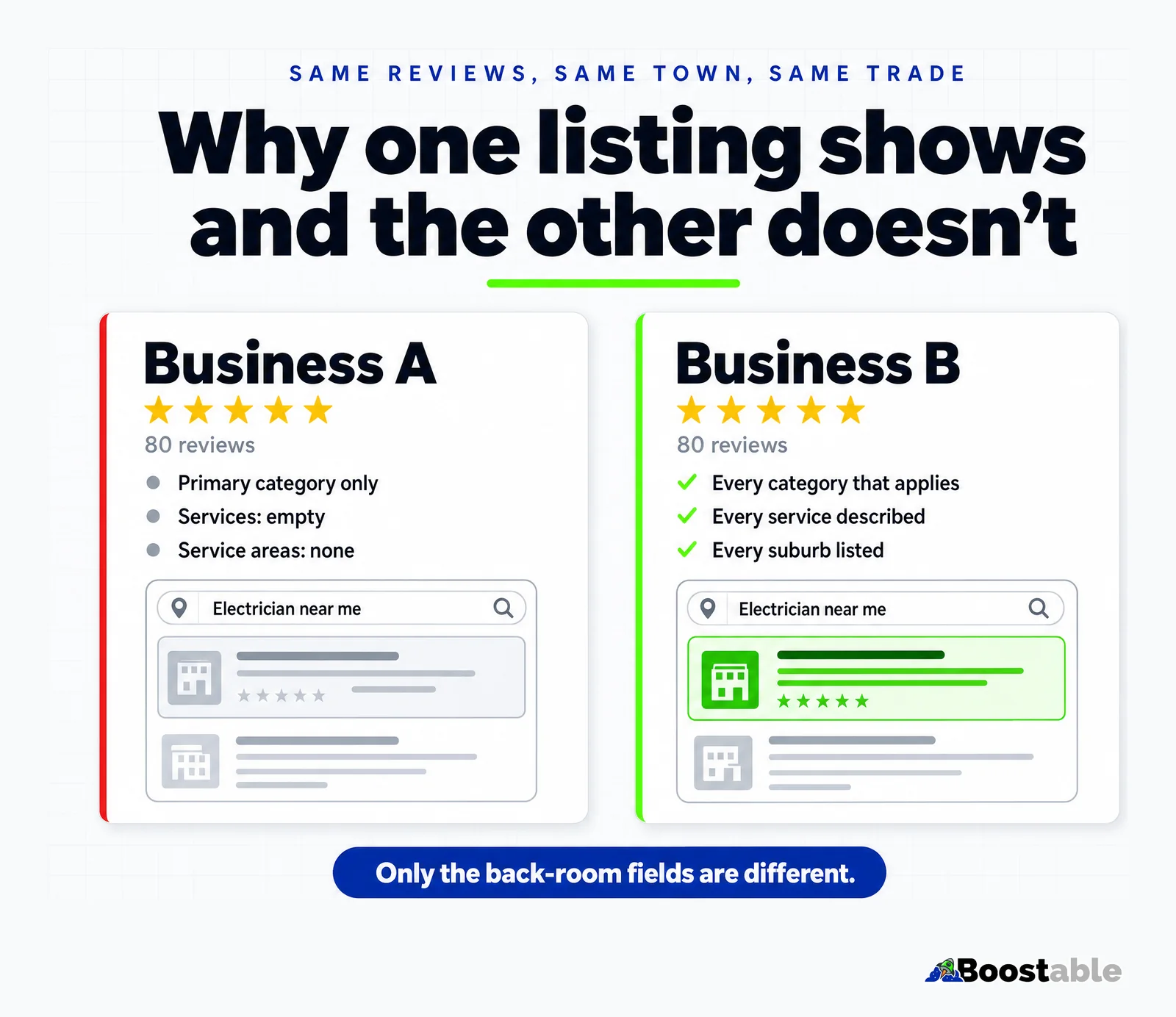
Google is also plain that you can't shortcut this. "There's no way to request or pay for a better local ranking on Google."[1] The business that gives Google the most to read wins, and the profile is free to claim and fill.[7]
"Tam made my buchanelectrical.com website for me. I really love it and so do my customers. I also now gain heaps of work from out of town companies thanks to the google presence he has created."
Lachlan Buchan ★★★★★ Verified Google review
The category decides everything after it
Of all the back-room fields, the primary category is the one that decides which race you're in. Google's guidelines say to "use as few categories as possible to describe your overall core business" and to "choose categories that are as specific as possible, but representative," and not to "use categories solely as keywords."[2] A tree service listed as "Landscaper" is competing with landscapers. A physio listed as "Medical clinic" is competing with GPs.
Pick the most specific category that describes the core of the business, then add secondaries only for things you genuinely do. Ten categories chosen because they sounded useful dilute the signal; two accurate ones sharpen it. Then fill the services under each, with a sentence per service in the words a customer would type.
Service areas are the other field that quietly decides where you show. Google lets you set up to 20, within about two hours' drive of your base, and tells businesses that don't serve customers at their address to remove the address and show service areas instead.[3] A tradie who works across twelve suburbs and has one set is telling Google to show him in one. Name them all, and then name them again on the website, which is the subject of listing your service areas.
Reviews are the second half
Once the fields are filled, reviews decide who wins. Most businesses send a text that says "please leave us a review" and cross their fingers. They get five words back: "Great service. Cheers mate." That's useless to Google. It doesn't tell the algorithm anything about what you actually did or where.
We do it differently. A QR code on the business card, scanned while you're still on the driveway. A short text with a few prompts: who did you talk to, what did we do, where. Google's own suggestion is to "ask customers to visit a Google link or scan a QR code."[6] Ask for detail and you get detail. Ask for nothing and you get nothing. Northwestern's research found purchase likelihood with five reviews is 270% higher than with none, and that it peaks between 4.0 and 4.7 stars,[8] so volume and honesty both matter more than a perfect score.
The login screen kills more reviews than poor service
Here's a small thing that costs a lot of reviews. Your happy customer taps the link. Google asks them to sign in. They panic, think something's wrong, put the phone down to make a cuppa, and never come back. Google confirms "customers must be signed into a Google Account to leave a review."[6]
Our text warns them. "You might need to log in to Google if you aren't already. That's normal." One sentence saves a review. Do it on every job.
The other friction point is the link itself. Send people to your Google page and they have to find the reviews tab, then the button, then the stars. Send them the direct review link, the one that opens the review box with the stars ready, and it's one tap. The free review card and text we set up use that link; if you're doing it yourself, get the link from the "Get more reviews" button in your profile, not from the address bar.
Tier two runs on a card and a text. We'll set both up for your business for free.
Get the free review systemConsistency across every platform
Here's where a lot of owners tangle themselves up. The website says one thing, the profile says another, and the reviews use a third set of words. Google reads all three. It sees the mismatch and treats it as uncertainty.
The fix is boring: use the same words everywhere. Same service names on the site and the profile. Same suburbs, spelled the same way. When we interview a client we write down their exact phrases and use them across the lot, and customers then describe the job in reviews using the same language. Google reads one consistent story and trusts it. Its ranking explainer is explicit that matching words "in the headings or body text of a webpage" make a page more relevant,[5] so a page on your site for each suburb, in the same words as the profile's service area, is what lets the two reinforce each other.
✓ Google can read it
✗ Google is guessing
- A broad category, or ten picked as keywords
- Services empty, or "all aspects of tree work"
- One service area, or an address you don't serve from[3]
- "Quality service at competitive prices"
- Website, profile and reviews all describing a different business
What changes, and how fast
Because most of tier one is the profile itself, the fixes move quickly. Google re-reads the profile often, so a corrected category or a newly filled services list can change which searches you appear for within days. Service areas are the same. The website side is slower, because pages have to be crawled and indexed, and reviews build at the pace you ask. Expect the profile changes to show first, the suburb pages over the following weeks, and the map-box position to firm up as the reviews come in. If nothing has moved after a month, the usual reason is that a field was filled with the wrong words: "arboricultural services" when customers type "tree removal".
Quality first, then quantity
You've got to do five-star work to get five-star reviews. That's the base layer. But if you do good work and never ask, the only people who review you are the ones with complaints. The happy customers assume you're fine and say nothing. The businesses that rank highest don't have perfect records. They have volume: fifty reviews at 4.6 stars beats ten at 5.0, every time, and volume comes from a system, not from hope.
"Tamhas is very well-versed in everything you might need to know about platforms including WordPress and Canva and is able to either get the job done efficiently or take you through the paces so you can learn the tricks of the trade and apply it for yourself for your future projects. I've had one session so far and I'll definitely be booking in with him again soon. 'Speaking tech' is an integral part of operating a successful business today. Thanks for helping me to learn the language!"
Nicole Chabot ★★★★★ Verified Google review
What to do this week
Three jobs, in this order. The first one is the one that makes the other two work.
- Verify the profile if you haven't; Google says you need to before you can edit it or reply to customers.[4]
- Open the profile and fill every field. Fix the primary category. List every service with a sentence. Set every suburb and town as a service area. Rewrite the description to say what, for whom, where.
- Put the same service names and suburbs on the website, in headings.
- Get a QR code printed on a business card, linked to your Google review URL, and hand one to every customer.
- Write a short text template: warn about the login, suggest they mention the job and the suburb, include the direct link. Send it the same day the job finishes.
The quiet truth
Your business isn't invisible on Google Maps because Google is punishing you. It's invisible because half the fields are empty. Fill them in, ask for real reviews, use the same words everywhere, and the listing that's been sitting there for years starts doing what it was always able to do. Most of your competitors won't, which is the whole opportunity. The field-by-field version is in the Google Business Profile guide, and if you'd rather we did the filling, that's what our local SEO service is.