
Service Area Business on Google: List Your Suburbs and Get Found
A service area business has no shopfront for Google to put on the map, so it ranks on what you tell it. Name every suburb on your website, match them in your Business Profile, and Google can finally show you to the customers two suburbs over. Here is how, and the mistakes that get you ignored.

By Boostable · 13 September 2026
Websites and SEO for Australian businesses · ~12 min read


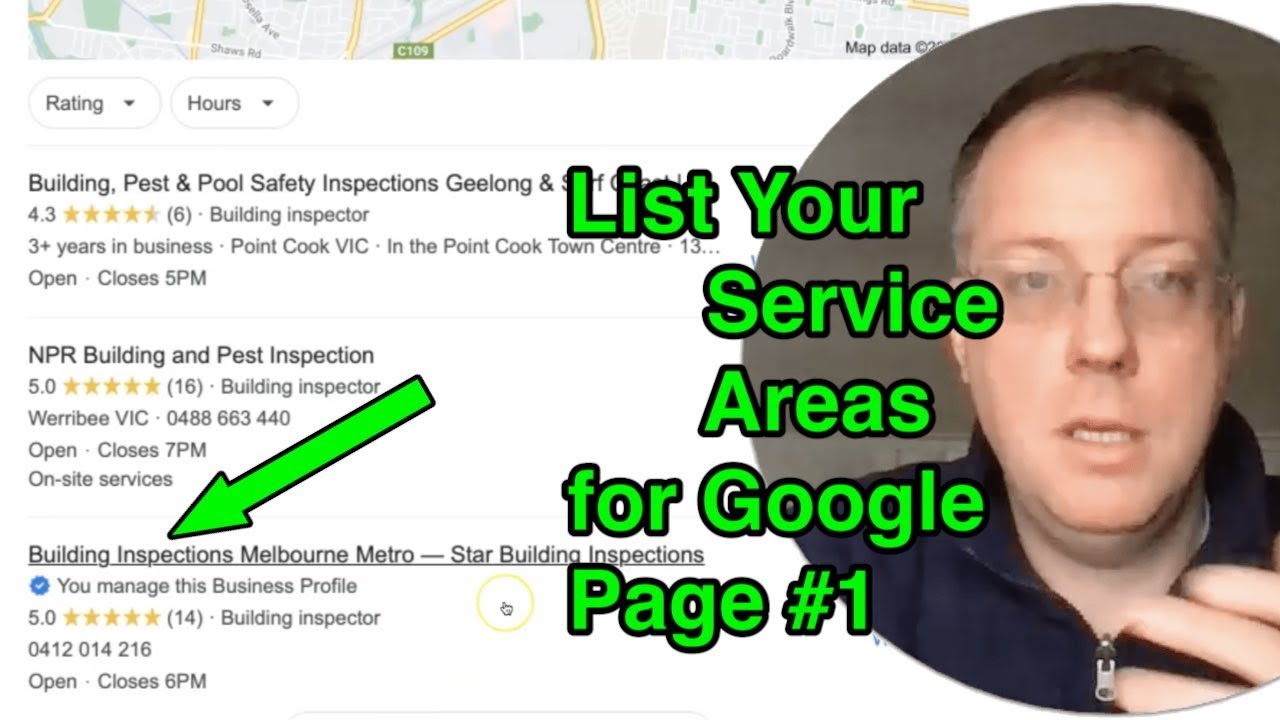 List Your Service Areas and Get Found on Google

Google knows where a cafe is. It has an address, a pin on the map, and a stream of people whose phones sat in that spot for forty minutes. A service area business gives Google none of that. A plumber in Cranbourne who works from Frankston to Pakenham has one van, one home address that should not be public, and a patch of Melbourne that exists only in the plumber's head.
That is the whole problem with local search for tradies and mobile services, and it has a plain fix. Google ranks what it can read. If your website says "we work in Frankston, Cranbourne, Dandenong, Berwick and Pakenham" and your Business Profile says the same, Google can match you to a search from any of those suburbs. If neither of them says it, Google has to guess, and it guesses the competitor who wrote it down.
This guide covers what Google means by a service area business, how to set the profile up properly, how to write the suburbs into your website without tripping Google's spam rules, and the mistakes that keep good tradies off page one for the suburbs they actually work in.
- Local SEO that names your suburbs: the service and suburb pages, matched to the profile, built for you.
- How Star Building Inspections hit page one across Melbourne
- Why is my business not showing on Google Maps?
- Local SEO for small business: how to get on page one
What Google means by a service area business
Google's definition is short: "a business that visits or delivers to customers directly but doesn't serve customers at its business address".[1] Plumbers, electricians, tree services, cleaners, mobile mechanics, pest control, landscapers, mobile dog groomers and most trades fit it. So does a building inspector, a removalist, and a caterer who delivers.
Google treats these businesses differently on the map. Instead of a pin at an address, your listing carries a list of the areas you serve, and Google says that when customers search for your service or its category, "they can find your profile and the areas you serve".[6] The listing shows in the map pack next to similar businesses in the area the customer is searching from.[6]
The important consequence is this. Google's local ranking rests on three things: relevance, distance and prominence.[2] A shop has a fixed point, so distance is easy for Google to work out. A service area business has no fixed point the public can see, so Google leans harder on the other two, and relevance is mostly what is written on your profile and your website. You control that.
A real example: the suburbs written down
A few years ago we set up a building inspector in Hoppers Crossing, in Melbourne's west, who was starting from nothing: a new name, no website, no profile. Building inspections are bought by suburb. People search "building inspection Point Cook" or "pre-purchase inspection Werribee", because the house they are buying is in that suburb, and they want someone who works there.
So the build named the suburbs everywhere Google could read them. A complete Business Profile with the address hidden and the western suburbs set as service areas. A website with a page for each service and, over time, a page for each suburb he genuinely worked in, each saying something specific about that area. The same suburb names, spelled the same way, in both places. Within the first few months the business was on page one for building inspections across the western suburbs, and in the map for the suburbs he had written pages for. The full story, including what happened when the blog went on, is in the Star Building Inspections case study, and the video above walks through the listing itself.
Nothing about it was clever. He worked in those suburbs. We wrote it down where Google could read it.
Half one: the Business Profile
Start with the profile, because it is quick and because Google publishes exactly how it wants it done.
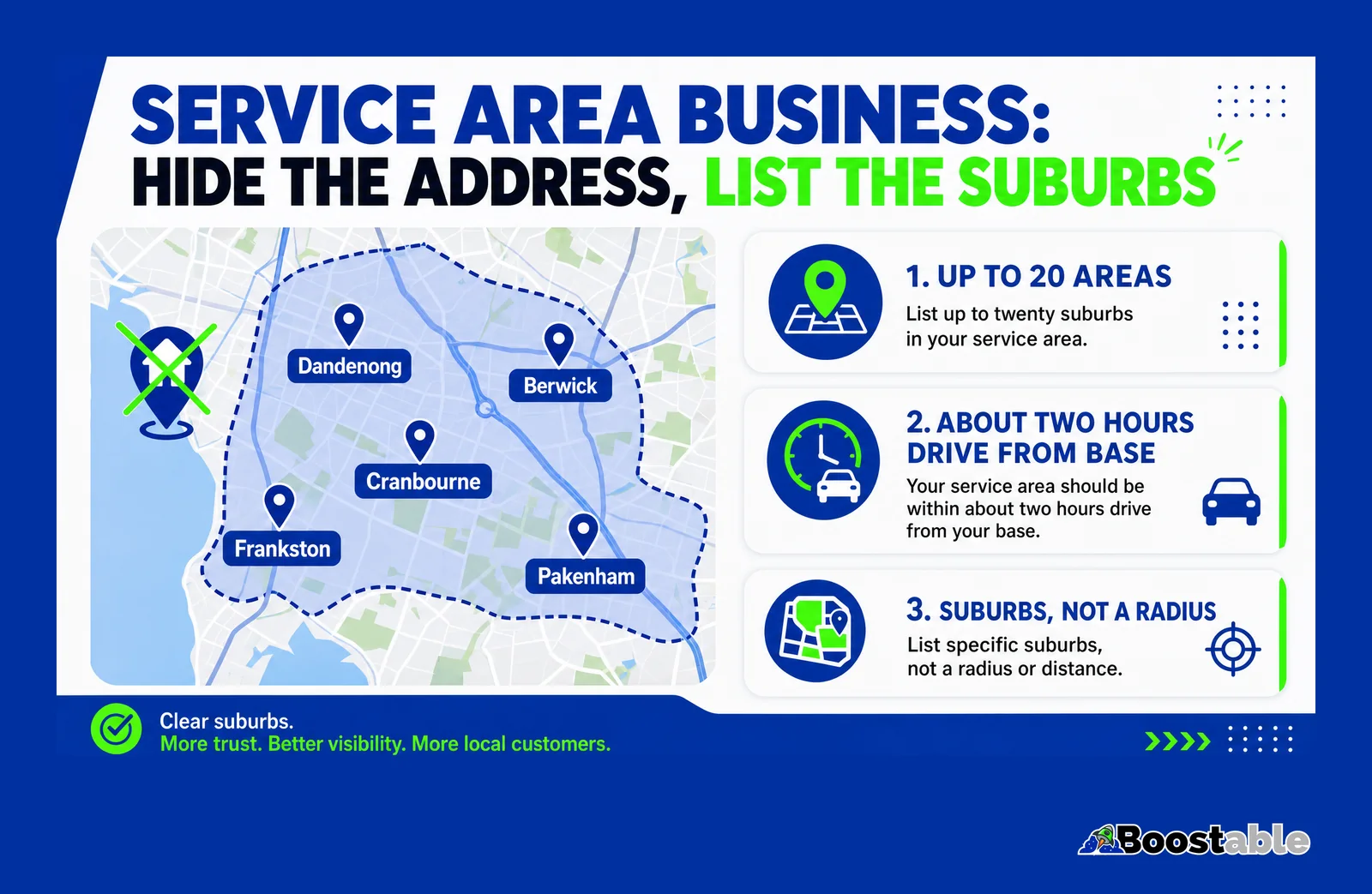
Hide the address
If customers do not come to you, Google says to remove the address from the profile.[1] Your home stays private and the listing stops looking like a shop in one suburb.
Add the areas by name
Up to 20, each as a suburb, a postcode or a region.[1] Google no longer uses a radius; you name the places. Use the suburbs customers actually search, not council names.
Stay inside two hours
Google's guideline is that the overall boundary should not reach more than about two hours' drive from your base.[1] Listing half the state gets the profile flagged, not found.
Set the main category
Relevance is the first ranking factor.[2] "Plumber", not "Contractor". Add secondary categories for the other things you do.
Fill in services
The services section is where "hot water repairs" and "blocked drains" live. Empty services means those searches do not match you.
Keep the name clean
The business name should be your real-world name as it appears on the van and the invoices.[3] Suburbs go in the service areas, not in the name.
Twenty is the limit, and for most tradies it is plenty. If you genuinely work across more than twenty suburbs, pick the twenty where you most want work, and let the website carry the rest. If you have a second base with its own crew, that can be its own profile, because Google's guideline is one profile per real location, not one per suburb.[3]
What if you have a shop and a service area?
Some businesses are both. A tyre shop that also does mobile fitting. A locksmith with a counter and a van. A caterer with a kitchen customers can visit and a delivery run across the city. Google calls these hybrid businesses and lets the profile carry both an address and a set of service areas.[6]
The rule is the same as for a pure service area business, with one addition: keep the address if customers genuinely come to it, and add the service areas for the places you go to them. Do not hide a real shopfront to look more mobile, and do not show an address for a workshop the public cannot walk into. Google's guideline is that the profile represents your actual, real-world location.[3] The website then carries both stories too: a contact page with the address and hours, and a service areas page with the suburbs.
Half two: the website
The profile tells Google where you work. The website is what convinces it. Google reads the pages on your site to decide how relevant you are to a search, and a site that never mentions a suburb cannot be relevant to a search from it.
The pattern that holds up is two layers.
One service areas page. A single page, linked from the main menu or the footer, that names every suburb and town you serve, grouped by region so it reads naturally. Not a wall of comma-separated names. A short paragraph per region that says something true: the kinds of homes there, the jobs you do most, how long it takes you to get there. Then the suburb list under it. This page is where the long tail of "plumber Carrum Downs" searches lands, and it carries every suburb you cannot fit in the profile's twenty.
A real page for the areas that matter most. For the five or ten suburbs where you do the most work, or want to, a page of its own with specific content: jobs you have done there, the common problems in that area's housing stock, photos from those streets, a review from a customer there. Each one links back to the main service page and to the service areas page.
Google's own page on local business markup describes the knowledge panel that can show for a business, and lists the fields it wants: name, address, phone, hours, and location coordinates.[5] Adding that structured data to the site, with the service areas written into the page text, gives Google the same story in two formats.
The mistake that gets you ignored: doorway pages
Here is where a lot of tradies, and a lot of cheap SEO, go wrong. Someone learns that suburb pages help, so they generate sixty of them. "Plumber Frankston", "Plumber Cranbourne", "Plumber Dandenong", each one the same 300 words with the suburb name swapped in.
Google names this in its spam policy. Doorway abuse is "when sites or pages are created to rank for specific, similar search queries", and one of Google's own examples is "having multiple domain names or pages targeted at specific regions or cities that funnel users to one page".[4] Generating lots of pages "primarily to manipulate search rankings" without adding value is a second policy, scaled content abuse.[4] Pages that break those rules do not rank; at worst they drag the rest of the site down with them.
✓ Rewards
- One service areas page naming every suburb, grouped by region, in real sentences
- A page for each of your busiest suburbs with jobs, photos and a local review
- Content that could only be about that suburb: the housing stock, the drains, the trees, the council rules
- Each page links to the service page and the service areas page
- The same suburbs, spelled the same way, in the Business Profile
✗ Removes
- Sixty pages, same text, suburb name swapped
- Pages for suburbs you have never worked in
- A "locations" page that is just a comma-separated list
- Suburb names crammed into the business name or the page title ten times
- A profile that lists twenty suburbs the website never mentions
The test for any suburb page is simple: could a customer in that suburb learn something from it that they could not learn from the page for the suburb next door? If the answer is no, merge it into the service areas page and move on.
"Highly recommended Tamhas. The whole website construction process was made easy and the result is professional, functional and easy to use. Back up service has been a well appreciated bonus for us too."
Kerry & Kevin Hill ★★★★★ Verified Google review
Suburbs listed, profile matched? Reviews from those suburbs are what push you into the map pack. The system that asks for them is free.
Get the free review systemThe two halves must match
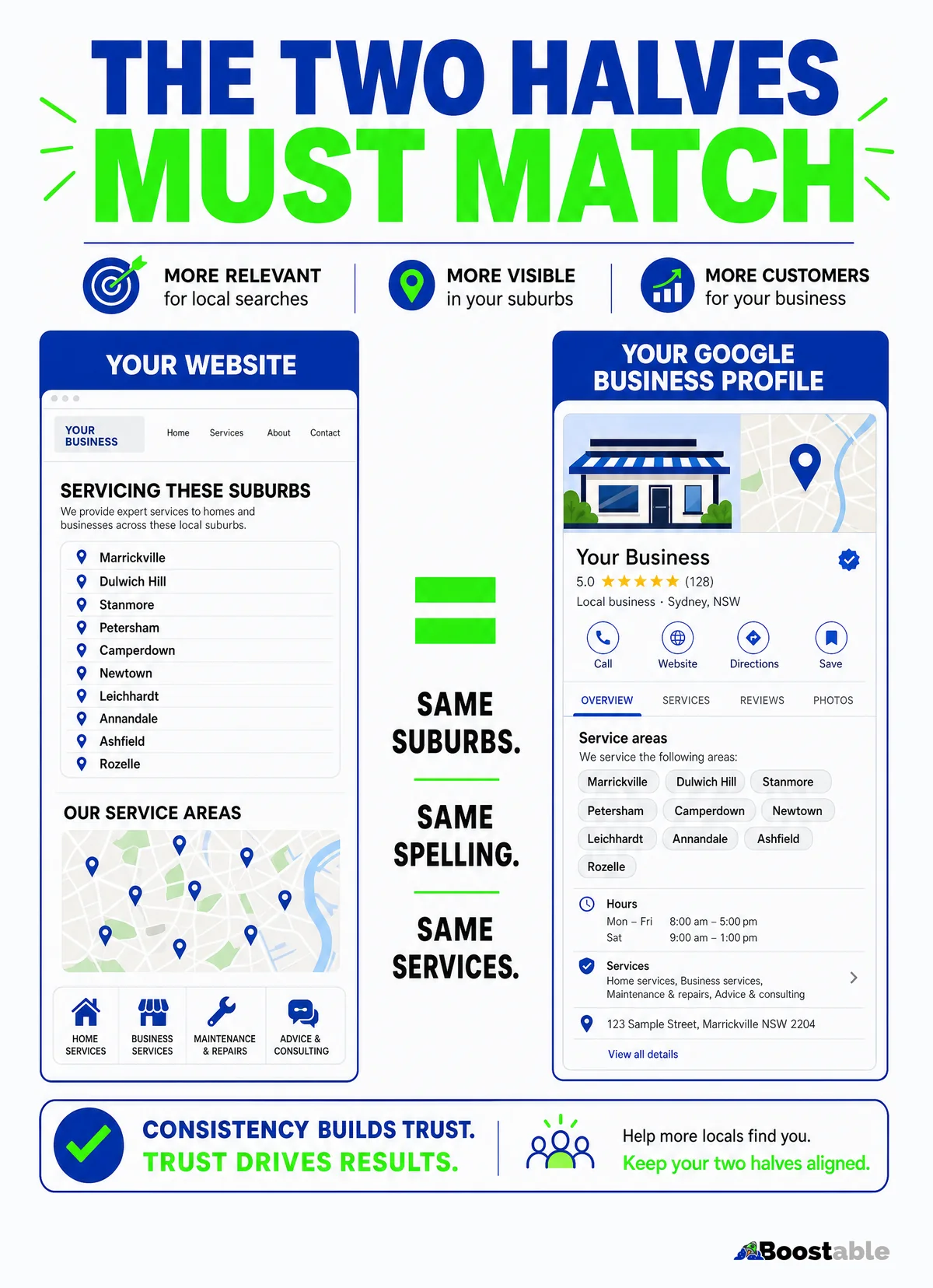
The single most common gap we find on a service area business is that the profile and the website disagree. The profile lists twelve suburbs. The website says "servicing Melbourne". Or the website has a careful service areas page and the profile still shows a home address in a suburb with no service areas set at all.
Google's ranking help says businesses "with complete and accurate info are more likely to show up in local search results".[2] Accurate includes consistent. When the two halves agree, Google has two independent sources telling it the same thing, and it trusts both more. When they disagree, it trusts neither much.
| Item | On the Business Profile | On the website |
|---|---|---|
| Suburbs | Up to 20 in service areas | All of them on the service areas page, the top ones with their own page |
| Spelling | "Mount Eliza" | "Mount Eliza", not "Mt Eliza" on one and "Mount" on the other |
| Services | Listed under Services | A page or section for each, using the same names |
| Business name | The real-world name | The same name in the header, footer and contact page |
| Phone | The number that rings the van | The same number, tappable, on every page |
| Hours | Customer-facing hours | The same hours on the contact page |
Reviews that name the suburb
There is a third place suburbs can appear, and it is the one competitors rarely think about. Customer reviews. A review that says "fixed our blocked drain in Berwick the same afternoon" tells Google, in a customer's words, that you work in Berwick and what you did there. Prominence is Google's third ranking factor, and reviews are part of it.[2]
You cannot write the reviews, and you should never tell customers what to say. But you can make it easy to leave one at the end of every job, and you can ask, in the ordinary way, if they would mention the job and where it was. Most people do when asked. Over a year, a plumber with a steady review flow ends up with the suburb list written across the profile a third time, by the people who matter most.
"Thank you very much for all your help and an amazing outcome everything is professional and perfect and I will pass on all your details to whom ever is in need of a great service….regards oliver"
oliver petter ★★★★★ Verified Google review
The map pack is the prize
For almost every "trade plus suburb" search, Google shows three businesses on a map before it shows a single website. That box is where the calls come from. A service area business can absolutely appear in it for a suburb it has no address in; that is what the service areas are for.[6] But it only appears when the three factors line up: the profile is relevant to the search, the business is plausibly close, and the profile is prominent enough to beat the other candidates.[2]
The suburb list on the profile and the website handles relevance. Hiding the address and setting honest areas handles distance as well as it can be handled without a shopfront. Reviews and a complete profile handle prominence. Do all three and you are competing for the box. Do none of them and you are relying on Google guessing correctly, which it will do for the tradie who wrote it down.
- Write down every suburb you actually work in. Be honest. If you drive to Werribee twice a year, it is not a service area.
- Sign in to your Business Profile. Hide the address if customers do not visit, and add up to 20 of those suburbs as service areas, staying inside about two hours' drive of your base.
- Set the main category to your main trade and fill in the Services section.
- Write one service areas page for the website: a short paragraph per region, then the suburbs, with the same spelling as the profile. Link it from the footer.
- Pick your five busiest suburbs and give each a page with something only true of that suburb: a job, a photo, a review.
- Check the name, phone and hours match exactly across the profile and the site.
- Put the review card in the van so the suburbs start appearing in customers' words too.
The quiet truth
Google is not ignoring your business because it does not like tradies. It is ignoring it because nobody told it where you work. A service area business ranks on what is written down: the suburbs on the profile, the suburbs on the website, and the suburbs in the reviews. Write them down once, keep them matching, and the customers two suburbs over can finally find you.


