WooCommerce Pay by Invoice: How a Bank Transfer Order Reaches Square
WooCommerce pay by invoice, done properly: the invoice is created in Square, the order number is the reference, and the order updates when it's paid.

By Boostable · 16 October 2026
Websites and SEO for Australian businesses · ~12 min read

If you sell wholesale, WooCommerce pay by invoice is the payment option you eventually have to solve. Trade customers on a monthly account don't tap a card at checkout. They want an invoice they can forward to their accounts person, a due date, and the freedom to pay when the money is ready. They also want it to match what your accountant sees.
The bank transfer option that comes with WooCommerce does the first half of that job. The order sits On hold, the customer sees your bank details, and you watch your bank account[1]. It does nothing in Square. If Square is your till, and your books read from Square, that order is invisible to both.
This post is how we closed that gap on a WooCommerce store connected to Square. Pay by invoice creates the invoice in Square. The order number is the payment reference. And the store updates itself when the invoice is marked paid.
What a standard bank transfer order leaves behind
WooCommerce's own documentation is clear about what its bank transfer option does. The order is set to On hold, because the store owner has to check the bank account for the deposit before processing it. The customer sees your bank details on the order received page and in the confirmation email. Nothing is confirmed automatically[1].
That's a sensible design for a store that is only a website. Your bank account is the system of record, you check it, you move the order on. The trouble starts when the website isn't the only place you record sales.
In Square
Nothing. Square was never told the order exists, so there's no invoice, no open balance and no record.
In your accounts
Square's Xero connection imports what you process through Square[4]. An order Square never received can't be part of it.
None of that is a fault in either product. Each is doing what it was built to do. The gap is in between, and a store that sells both online and in person has to close it somewhere.
Why wholesale customers make this a daily problem
A retail customer who wants to pay by bank transfer is an occasional order. A wholesale customer is a pattern. Trade buyers often hold a monthly account. They order several times a month, they don't pay on the spot, and they pay against an invoice.
If your checkout only takes cards, those customers are stuck. They ring you, or they email, and somebody on your team keys the order in by hand. If your checkout offers the standard bank transfer, they can order. But now you have the problem above, repeated every week. Orders sit On hold in the store, Square has nothing, and your bookkeeper asks why the totals don't agree.
Trade customers also want three things a retail checkout rarely gives them. They want the price they're entitled to. They want an invoice with a number they can quote. And they want a due date they can plan around. Pay by invoice has to deliver all three, or it's just a bank transfer with a longer name.
"We gave Tamhas the difficult job of making our site and creating a unique catalogue for the upgrades we offer. He did a fantastic job, is very professional and highly recommended. Thanks for a job well done!!"
Eric Fenollar ★★★★★ Verified Google review
What we built: pay by invoice that creates the invoice in Square
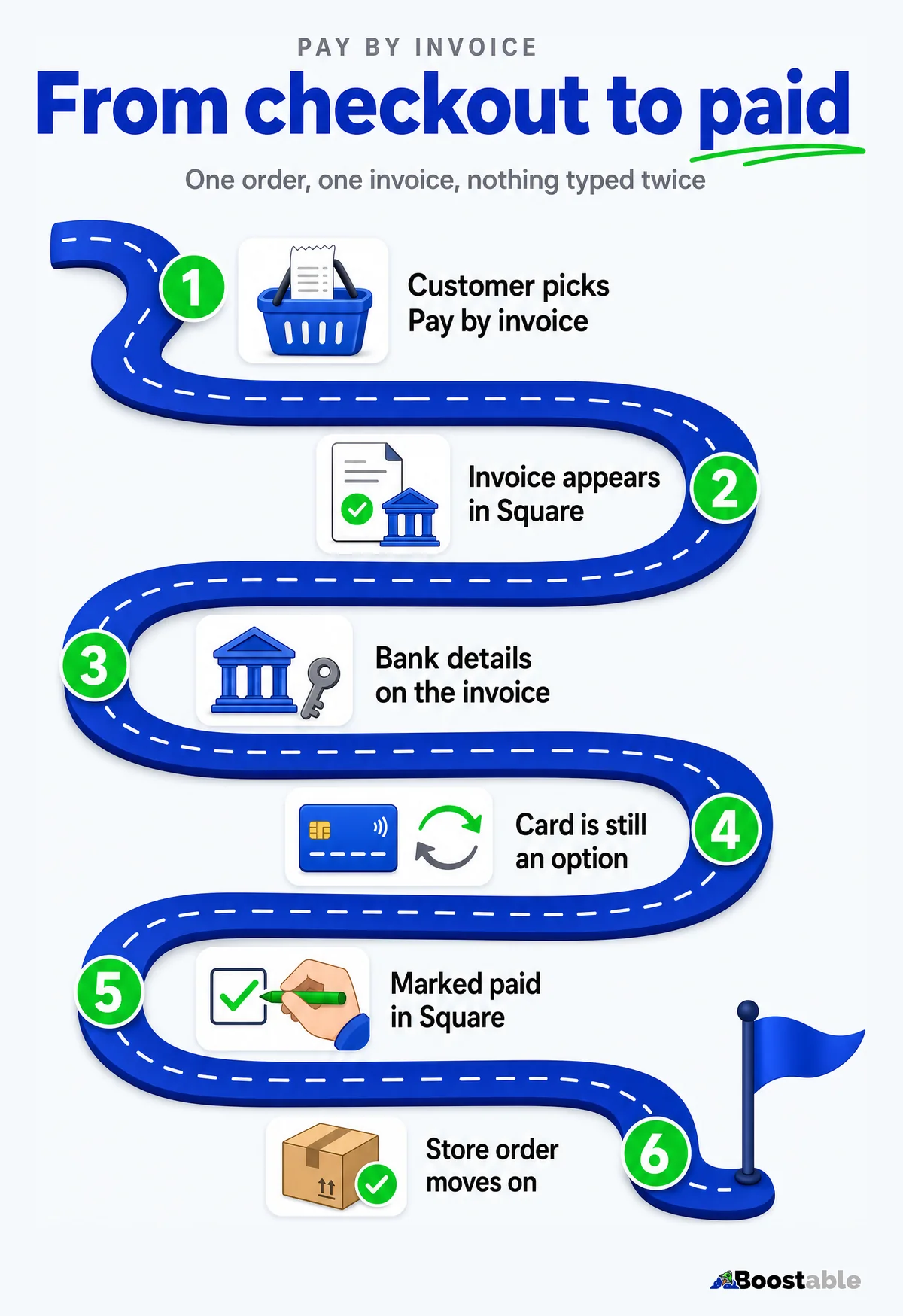
Boostable exclusive Out of the box, WooCommerce's bank transfer option doesn't tell Square anything. We built the step that does. When a customer chooses pay by invoice at checkout, the store creates a real invoice in Square, and the two systems keep track of each other from there.
The customer chooses pay by invoice
WooCommerce records the order exactly as it always does, so your stock, your emails and your reports carry on as normal.
The order goes to Square
We find or create the customer in Square, then create an order with the same items at the prices actually charged, GST included.
The invoice is created and sent
It carries the order number as its title and reference, with your bank details printed on it. Square can send it, or the store can, whichever suits that customer.
The customer pays when they're ready
By bank transfer using the details on the invoice, or online by card from the invoice link. Either way, it's the same invoice.
You mark it paid in Square
When the money lands, your team marks the invoice paid[3]. The order in WooCommerce moves on by itself.
A change in one place reaches the other
Cancel the order and the invoice is cancelled. Mark the order paid in the store first and the open invoice is closed, so it can't be paid twice.
There's one safeguard we'd never skip. Before an invoice goes out, we check that Square's total matches the store's. If they differ by more than a couple of cents, no invoice is sent. An invoice that disagrees with the order is worse than no invoice, because it's the one a customer will quote back to you.
The invoice itself is a real Square invoice. Square describes its invoices as something customers can pay by card, Apple Pay, Google Pay or Afterpay, and that you can send by email, text message or a shareable link[2]. That means the customer gets something familiar: a document with a number, a total and a button.
If the customer changes their mind
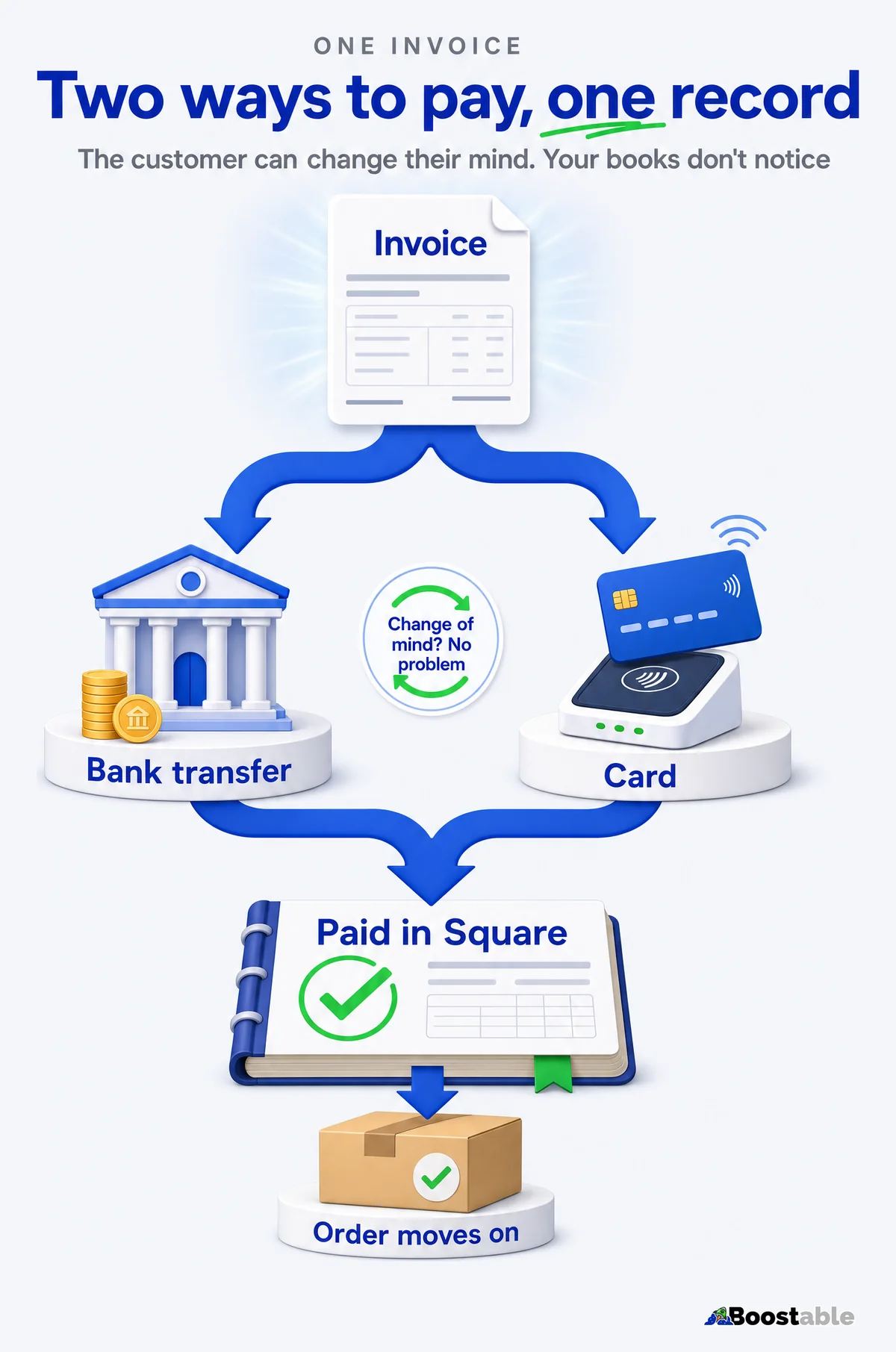
This is the part that stores most often get wrong, and it's why we put the bank details on the invoice instead of only on the thank-you page.
A customer chooses bank transfer at checkout. Two days later they'd rather put it on a card. In a standard store, that's a small mess: the order is On hold, the bank details are in an email somewhere, and someone has to cancel the order and start again, or switch the payment method by hand.
With the invoice in Square, nothing needs undoing. The bank details are on the invoice for the customer who wants to transfer. The online payment link is on the same invoice for the customer who has decided to use a card. They can choose either, at any point, because it's the same document. Your records stay in step whichever way the money arrives.
✗ Bank details only in an email
- The order is On hold and Square has no record
- A card payment means cancelling the order and starting again
- Two documents, two references, one confused customer
✓ Bank details on the Square invoice
- The order and the invoice already exist and already agree
- Transfer or card, the customer chooses from the same invoice
- One number, one document, one reference
Why not just send a WooCommerce invoice?
It's the obvious question, and plenty of stores do exactly that. A plugin generates a neat PDF invoice from the WooCommerce order and emails it with the confirmation. The customer pays by transfer, and everything looks professional.
But the invoice is a PDF of a WooCommerce order, and Square hasn't seen it. There's no open invoice in Square, no balance owing in Square, and nothing for your accounting connection to read. You have a nice document and the same gap. The invoice should exist in the system your money and your books are built around, with the PDF as a copy of it.
Wholesale orders with freight: the order isn't final until the postage is
Boostable exclusive Many trade stores have too many freight options for a live postage calculator to cover. Some carriers have no rates you can pull automatically, and some jobs need a person to choose the courier. Guessing the postage at checkout means either charging too much or absorbing the difference.
So for wholesale customers, checkout is honest about it. The order is received, the customer is told it's not finalised until the postage is added, and nobody is charged a guess. Your team adds the postage in the store's admin, and the customer then receives their invoice, due on the terms you've set for them.
The last step is the one customers notice. Before an order is marked complete, your team enters the tracking number. The customer then gets an email with a tracking link for whichever carrier was used, so they can follow the parcel without ringing you.
| Step | Retail customer | Wholesale customer |
|---|---|---|
| After checkout | Thank-you page shows the bank details and the order number to use as the reference | Message that the order isn't final until the postage is added |
| The invoice | Created straight away in Square | Created once your team has saved the postage |
| Payment terms | Shorter, set by you | Longer, set by you |
| Prices | Retail prices, and any member specials | Their wholesale prices, because they're logged in |
| When it ships | Tracking link emailed with the dispatch | Tracking link emailed with the dispatch |
Retail customers who simply prefer a bank transfer
Not every bank transfer comes from a trade account. Plenty of retail customers would rather pay by transfer than put a card number into a website, and they shouldn't get a worse experience than your wholesale buyers.
For them, the flow is lighter. The thank-you page shows your bank details and tells them to use the order number as the payment reference. Behind the scenes the invoice is created in Square straight away, so the order exists in both systems from the first minute. The store sends the confirmation email, and the customer pays when they're ready. If they'd rather use a card after all, the invoice link is there.
Retail terms are usually shorter than wholesale, because you're waiting on one parcel's payment rather than a month's account. Because the terms are set per customer type, you decide both, and you can change either later without touching the checkout.
What your team actually does
This only works if it's easy for the people running the store. There are two jobs, and neither takes more than a minute.
For wholesale freight orders, your team saves the postage. For every pay-by-invoice order, your team marks the invoice as paid in Square when the money arrives. The order number is on the invoice and on the deposit, so finding the right invoice is a search, not a hunt.
Marking an invoice paid for a bank transfer is a normal Square action. You choose the payment method, and Square records the amount for tracking only: it won't send you a deposit for it[3]. That's exactly right here, because the money has already come into your bank account as a normal transfer. Square's record now matches what actually happened.
The order number is the reference everywhere: on the invoice, on the bank deposit and in the store. Your team doesn't match amounts and guess. They search one number and find the order, the invoice and the payment.
What it means for your books
Square's Xero connection brings what you process through Square into Xero as daily summaries: card, mobile wallet and cash transactions, plus refunds and fees[4]. Xero's own description is that sales sync daily and match to the bank feed automatically[5].
The point of pay by invoice is to put these orders inside that picture, instead of beside it. An order that lives only in WooCommerce is not part of Square's daily summary. An order with an invoice in Square is a record Square knows about.
Whether a particular invoice then appears in your accounts exactly the way your bookkeeper wants depends on how your accounting connection treats invoices. We don't promise that on your behalf. We check it with you and your bookkeeper when we set the store up, with a real order, before you rely on it.
There's one more principle worth stating. You don't want two pipelines. If Square already feeds your accounts, and WooCommerce also feeds your accounts, the same sale can arrive twice, or arrive once with two different totals. One pipeline, with everything in it, is easier to trust and easier to reconcile.
Before the invoices, the customers. Our free review system puts a QR card in every parcel and gets your Google reviews moving.
Get the free review systemThree ways stores get pay by invoice wrong
These are the patterns we steer people away from, whichever platform they're on.
Treating the PDF as the invoice. A document that exists only in the store is a receipt for an order the rest of your systems haven't heard about. The invoice should be created where the money is recorded.
Marking the same order paid in two places. If both systems can say "paid", someone will eventually say it twice, or in the wrong order. Each side should react to the other, so one action in one place is enough.
Guessing the postage. A freight charge the customer didn't expect is the quickest way to lose a trade account. If the postage needs a person, say so at checkout, and send the invoice when it's right.
What it takes to set up
It starts with a look at your Square account and the way your customers actually order. We need to know your customer types, your terms, and how you handle freight.
Then we connect the store to your Square account, set up the invoice with your bank details and your reference, and put a real order through from checkout to paid. We check that the totals agree. We check that the order moves on when the invoice is marked paid. And we check what your bookkeeper sees. Your team gets a short walkthrough of the two jobs above, and the store carries on from there.
- Do you have wholesale or account customers? They pay on invoice, whether your checkout lets them or not.
- Do bank transfer orders sit On hold with nothing in Square? That's the gap above.
- Does your bookkeeping read from Square? Then orders Square never saw don't reach it.
- Do customers ring to change how they're paying? One invoice that takes a transfer or a card ends those calls.
- Does postage need a person? Then the invoice should wait for the postage.
If two or more of those are a yes, this is worth solving. See how WooCommerce and Square work together, or book a free call and we'll look at your Square account with you.
The short version
A standard WooCommerce bank transfer leaves the order On hold in the store and invisible to Square. Pay by invoice that creates the invoice in Square puts the order in both systems, makes the order number the reference, lets the customer pay by transfer or card from one document, and updates the store when your team marks it paid. Wholesale freight orders wait for the postage before the invoice goes out. Whether the invoice then reaches your accounts the way you want is something we check with your bookkeeper with a real order.