
Google Merchant Centre: Get Your Stock Found on Google for Free
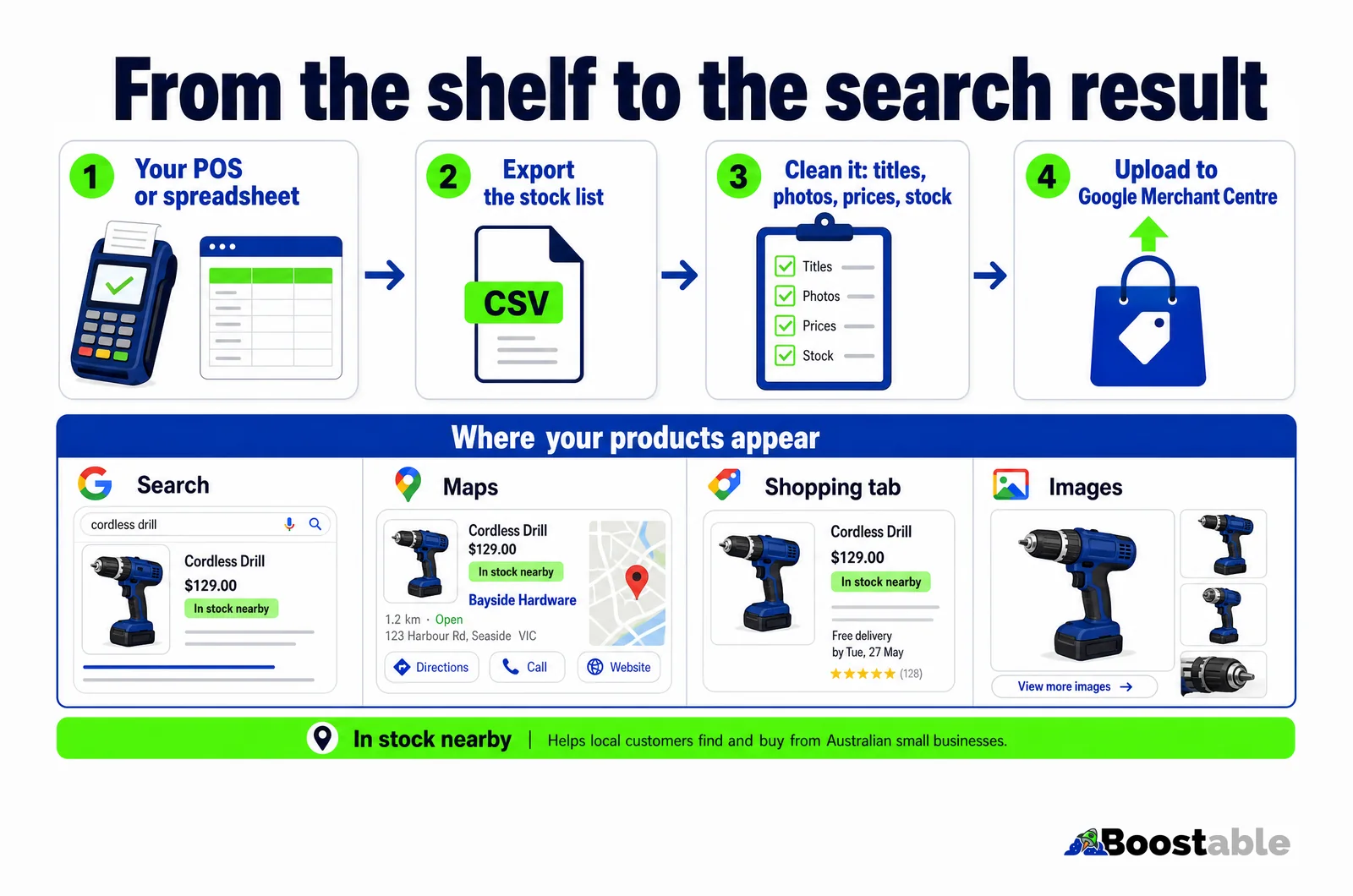
Your stock list already exists in your POS. Google Merchant Centre puts it in front of people searching Google, Maps and the Shopping tab, for free. Here is how an Australian shop exports it, cleans it and gets it live, with click and collect on the end.

By Boostable · 13 September 2026
Websites and SEO for Australian businesses · ~14 min read

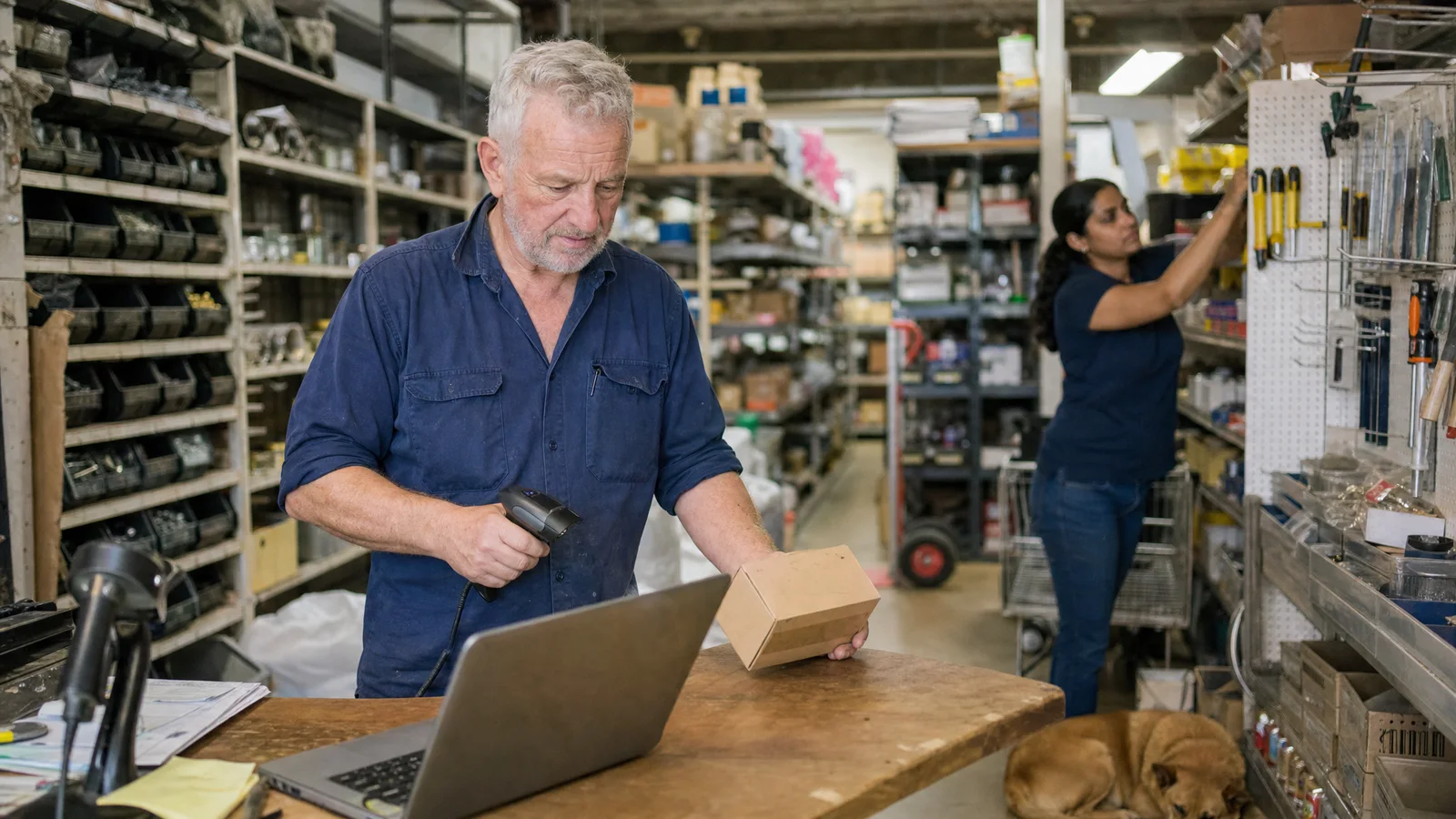
Every shop we work with already has a stock list. It lives in the point-of-sale system, or in a spreadsheet, or in the accounting software, and it has been quietly kept up to date for years because you cannot run a shop without one. Every product in the place has a name, a price, a barcode and a count.
Almost none of that list is visible to the people down the road searching Google for the thing sitting on your shelf. That is the gap this guide closes. Google Merchant Centre is the free tool that takes your stock list and shows your products in Google Search, Google Maps and the Shopping tab, and it will tell a nearby shopper that you have the item in stock right now.[1] You do not need to become an online retailer to use it. You need to export the list you already have, tidy it up, and upload it.
We will go through the whole thing: why it matters for an Australian shop, what Google actually needs from you, how to get the list out of Square or whatever you run, how to clean it so Google approves it, and how to put click and collect on the end so the search turns into a sale.
- E-commerce that sells in the shop and online: Square and WooCommerce builds where one stock list feeds the counter, the website and Google.
- How customers actually find a local business in 2026
- Google Business Profile optimisation: the complete guide
- Increase leads per dollar with a landing page
Why your stock is invisible, and why that costs you
Think about how a customer shops for a specific item now. They do not drive to three shops. They pick up the phone and type the product name into Google. If your shop does not appear with that product, a price and the words "in stock", the customer either buys from a big online retailer or drives past you to the chain that does show up.
The numbers say this behaviour is not a niche. Google reported that searches for "who has" plus "in stock" grew by more than 8,000 per cent in a year, and searches for "local" plus "business" grew by more than 80 per cent.[5] People want to know who has the thing, near them, today.
Here is the part that should cheer up every shopkeeper. Online is still the minority of Australian retail. The Bureau of Statistics put total retail turnover at $37.9 billion for June 2025, with online sales at $4.7 billion. In original terms, online was 12.7 per cent of the total.[4] Roughly seven in every eight retail dollars are still spent in a physical shop. The customer searching on their phone is very often planning to walk into a store. The question is only which one.
So the opportunity is not to compete with the giant warehouses on delivery. It is to be the shop that shows up with the item in stock, two suburbs away, ready to pick up this afternoon. That is a race the local shop can win, and Google gives you the tool to enter it for nothing.
What Google Merchant Centre actually is
Google Merchant Centre is the place where a retailer gives Google its product list. Google's own description is plain: products you sell can appear at no cost on Google Search, Google Maps, YouTube, the Shopping tab, Google Images and Google Lens.[1] These are called free listings. Google adds that they "support both online and local in-store sales", which is the bit that matters for a shop.[1]
There is a paid side, Shopping ads, and you can add it later if the free listings prove the demand. But you do not need to spend anything to get started, and most shops we set up run for months on free listings alone before they consider ads.
Two honest caveats from Google's own help pages. First, being approved for free listings does not guarantee your products will be shown to anyone; Google decides what to show based on the search and the quality of your data.[1] Second, there are conditions: you need to follow the listing policies, have a return policy on your website, and set up shipping details or add shipping costs to the product data.[1] None of that is hard. It is a checklist, and we will get to it.
Where your inventory already lives
Before you build anything, find the list. In almost every Australian shop it is in one of three places.
| Where it lives | What it usually has | How to get it out |
|---|---|---|
| Point-of-sale system (Square, Lightspeed, Vend and the like) | Item name, price, SKU, barcode, category, stock count, sometimes a photo | Items or Library section, export to CSV |
| Accounting software (Xero, MYOB) | Item code, name, sale price, sometimes quantity on hand | Products and services, export |
| A spreadsheet someone built years ago | Whatever the person who built it cared about that day | It already is a spreadsheet; save a copy |
| Supplier price lists | Product codes, descriptions, wholesale prices, often the official product photos | Ask the rep for the CSV; they usually have one |
If you run Square, the export is in the Items library on the dashboard and it comes out as a CSV with the name, variation, SKU, GTIN, price and stock. One thing to know: Square has a built-in feature that pushes items straight to Google, but Square's support pages state that its Google free and local product listings are "available only to sellers in the United States".[6] An Australian Square merchant does not get the one-click sync. You export and upload, or you run Square alongside a WooCommerce website that feeds Google automatically. We build a lot of the second kind, and it is the setup we recommend when the shop has more than a few dozen products, because nobody keeps two lists in sync by hand for long.
Do not clean the list inside the POS. Export a copy, clean the copy, and keep the original running the counter. You will make mistakes on the first pass and you do not want them ringing up at the till.
What Google needs for every product
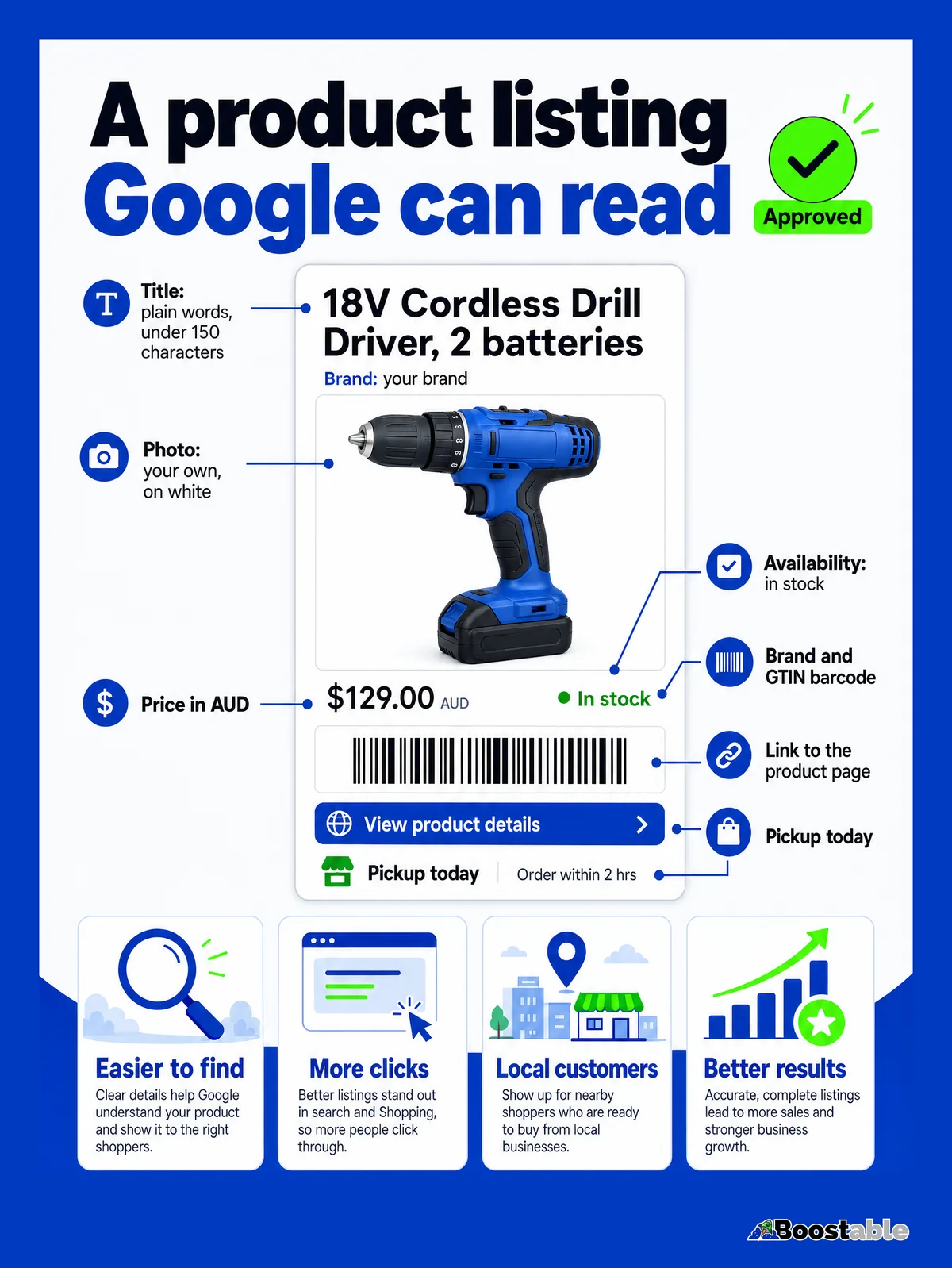
Google publishes a product data specification, and it is the checklist for whether your upload is approved. The required fields are shorter than most people expect.[2]
ID
A unique code for each product. Your SKU is fine. It must never change, because Google uses it to recognise the product on every future upload.
Title
The product's name, up to 150 characters. Plain words a customer would type: brand, product, size, colour. Not your internal code.
Description
Up to 5,000 characters. A few honest sentences about what it is and who it suits. Copy the supplier's if you must, but your own words do better.
Link
The page on your website for that product. Google sends the customer here, so it has to exist and show the same price.
Image link
The web address of the main photo. Your own photo on a plain background, or the supplier's official image.
Availability
In stock, out of stock, or preorder. This is the field that makes "in stock nearby" possible, so it has to be true.
Price
The price in Australian dollars, including GST, matching the price on the product page to the cent.
On top of those seven, Google asks for the brand on nearly everything and strongly recommends the GTIN, which is the number under the barcode.[2] If a product has no barcode, Google wants the manufacturer part number instead, and if the item is used or refurbished you have to say so in the condition field.[2] The GTIN is worth the effort. It is how Google knows your "DeWalt 18V drill" is the same product as everyone else's, which is what lets it show you alongside them in a price comparison.
The good news is that a POS export usually has five or six of the seven already. The two that are almost always missing are the link and the image link, and that is because they need a website with a page per product. Which brings us to the real job.
Cleaning the list so Google says yes
This is where most first attempts fail, and it is nearly always the same handful of problems. Go through the export with these in mind.
✓ Approved
- Title in customer words: "Makita 18V Cordless Drill Driver, 2 batteries"
- Price on the feed matches the price on the page, GST included
- Availability reflects the shelf today
- A clear photo of the actual product on a plain background
- One product, one unique ID, forever
- A return policy and contact details visible on the website
✗ Rejected
- Title is an internal code: "DRL-18-MK-2B" or "SPECIAL!!! BEST PRICE"
- Feed says $199, page says $189, or a sale ended and only one was updated
- Everything marked "in stock" because nobody set the field
- Photo has a watermark, a price sticker, or is a lifestyle shot of six products
- IDs regenerated on each export so Google sees new products every time
- No return policy, no shipping details, no way to contact the shop
Titles are the biggest lever and the easiest fix. Google says it uses your product data "to match your products to the right queries".[2] If the title says what a customer would type, you match. If it says what your supplier's warehouse calls it, you do not. A good title reads like a label a customer would understand: brand, what it is, the size or model, the colour or variation. Keep it under 150 characters and put the important words first.
Photos come second. A phone photo on a white bench in daylight beats no photo, and it beats a supplier photo with a red "SALE" banner burned into it. If the supplier has clean official product shots, use them; they are usually free to retailers who ask.
Availability comes third, and it is a discipline rather than a one-off. The whole point of local listings is Google telling a nearby shopper you have the item.[3] If that is wrong, you have sent someone across town for nothing, and they will tell Google about it in a review. Set the field honestly, and set up a way to keep it honest, which is where a website that reads your live stock earns its keep.
"We gave Tamhas the difficult job of making our site and creating a unique catalogue for the upgrades we offer. He did a fantastic job, is very professional and highly recommended. Thanks for a job well done!!"
Hoppers Stoppers ★★★★★ Verified Google review
A catalogue is exactly what Google wants from you. Not a brochure, not a homepage with "we stock all major brands", but one page per product with a name, a photo and a price. Once that exists, the feed is nearly automatic.
Getting it live: the upload
With a clean list and product pages on your website, the mechanics are short.
- Create a free Merchant Centre account with the same Google account that owns your Google Business Profile. Linking the two is what lets Google connect products to your shop on the map.
- Verify and claim your website address. Google needs to know the product links belong to you.
- Add your shipping settings, or add a shipping cost to each product, and make sure your return policy is on the website. Google lists both as requirements for free listings.[1]
- Upload the product list. A spreadsheet upload works to start; a live feed from the website is better because it updates itself.
- Turn on free listings and, if you want "in stock nearby", the free local listings as well.
- Wait for review. Products sit as pending while Google checks them. Square quotes three to five days for Google's approval of items sent from its system, and that is a fair expectation for any first upload.[6]
- Fix whatever Google flags. It tells you exactly which product and which field. Fix, resubmit, done.
Once you are through review, the ongoing work is keeping prices and stock current. That is the reason we push shops towards a website feed rather than a spreadsheet. A feed reads the live catalogue, so a price change at the counter reaches Google on the next update without anyone remembering to do it. With Square in Australia, that means running WooCommerce alongside it and letting the two share the catalogue.
Want your shop, your website and Google all reading one stock list? Start with the free review system and we will talk through the rest.
Get the free review systemClick and collect is what turns the search into a sale
Being listed gets you seen. Click and collect gets you chosen. Google's local listings can carry pickup options on the product itself: "pickup today" for same-day or next-day collection in store, and "pickup later" for items that can be at the store within a set time.[3] Google also lets you show in-store availability either on a page it hosts or on your own product page.[3]
Put yourself in the customer's position. Two listings for the same drill at the same price. One says "delivery in 3 to 5 business days". The other says "in stock, pick up today, 2.1 km away". If they need the drill for a job tomorrow, the second listing wins every time. That is not a marketing trick. It is the one advantage the warehouse cannot copy: you are physically close, and the item is on the shelf.
Setting up pickup does not require online checkout. The simplest version is a "reserve for pickup" button on the product page that sends you a message and holds the item. The full version takes payment online and prints a pick list. Both count. Google reported that Maps searches for "curbside pickup" grew nearly 9,000 per cent in a year in the United States, and while that spike was pandemic-driven, the habit stuck.[5]
Why the local shop has the edge here
The big chains have sorted this out for their own products, and they have teams doing it. What they do not have is you. A chain's listing says "available at 14 stores". Yours says "in stock at the shop on the corner of the main street, ask for Dave". Google's local listings are built to surface exactly that, letting local shoppers know "your store has the products they're looking for, at the moment they search".[3]
Regional shops have an even bigger opening. In a city, a customer searching for a specific part might see six local results. In Wangaratta or Dubbo or Albany, they might see one, and if it is you, you have the sale. Most regional retailers have not uploaded a product list to Google at all, so the first one in each town to do it properly tends to own those searches for a long time.
"Constructed an awesome website with woocommerce in 48 hours from my basic description. It turned out better and had more features than I had even hoped for. No fuss, good communication and the job was done."
Wet Electronics ★★★★★ Verified Google review
The website is the piece most shops think will take months. It does not, if it is built to read a catalogue rather than to be typed out by hand. Once the product pages exist, the Google feed, the pickup option and the stock count all come from the same place.
What it costs, honestly
Google Merchant Centre: free. Free listings: free. Local listings: free.[1] The costs are in the two things around it.
The first is your time to clean the list. For a shop with 200 products and a decent POS export, a full day is a fair estimate for titles, photos and checking prices. For 2,000 products, it becomes a project, and the answer is to start with the 200 you sell most and add the rest in batches.
The second is the website with product pages. If you already have one, the feed is a small job. If you do not, that is the build, and it is the part we do. The feed, the pickup button and the stock sync all come with it; they are not add-ons.
Against that, weigh what a single "in stock nearby" sale is worth to you, and how many of them a month it would take to pay for the setup. For most shops the answer is a handful.
- Export your stock list from the POS to a CSV. Do not clean the live one. Save a copy and work on that.
- Sort it by sales and take the top 50 products. Rewrite each title in customer words: brand, product, size, colour, under 150 characters.
- Check every one of those 50 has a clean photo. Ask suppliers for official images where yours are missing.
- Check your website has a page for each of the 50 with the same price. If it has no product pages, that is the job to book in.
- Make sure your return policy and contact details are on the website. Google requires both before it lists you.
- Open a free Merchant Centre account with the Google account that runs your Business Profile, and upload the 50 as a first batch.
- Put "in stock, pick up today" on the pages that are true, and make sure the phone number on the listing rings through to the shop floor.
The short version
Your stock list already exists. Google will show it to the people near you searching for those products, for free, and it will tell them you have the item in stock. The work is exporting the list, cleaning the titles and photos, and giving each product a page on your site. Once that is done, a live feed keeps it current and click and collect turns the search into a walk-in. Seven in eight retail dollars are still spent in shops. Make sure the shopper searching on their phone can see that yours has the thing.


