Is My Website Working? The Bar-Stool Test for Small Business Websites
Is my website working, or just sitting there looking nice? The bar-stool test: count the strangers who rang or filled in the form in the last 90 days. Then the five things a working site does, why most fail, and what to fix first, with Google's own numbers.

By Boostable · 13 September 2026
Websites and SEO for Australian businesses · ~11 min read


Most small business websites look fine and don't work. The owner paid the bill, the designer shook hands, the site went live, and then the leads didn't come. If you've ever typed "is my website working" into Google, or just wondered it at the end of a quiet month, this is the test we use, and it doesn't need an analytics dashboard. It needs the last 90 days and a bit of honesty.
Then the five things a working site does, why nearly every failing site fails the same way, what to check in order, and how to count the leads properly so you never have to wonder again. Every number quoted is Google's own or the regulator's, with the source at the end.
- Web design with Boostable: a site built to be found and to get the phone ringing.
- Small business website tips: eight plain things that work
- How fast does your website need to be?
- The questions to ask your web designer before you sign
What a website is actually for
A business website has one job: get leads. Not "present the brand." Not "tell our story." Not "showcase our vision." Those are nice side effects. The job is leads. If the site isn't getting them, it doesn't matter how modern it looks, how clever the animations are, or how much the designer charged. It's broken. A pretty website that doesn't get leads is a salesman in a nice suit who won't open his mouth.
The bar-stool test
Forget the fancy dashboards for a minute. Here's the test you can do on a bar stool. Look at the last three months. How many strangers rang your phone or filled in your contact form because of the website? Not existing customers. Not mates. Not the bloke who already had your number. Strangers.
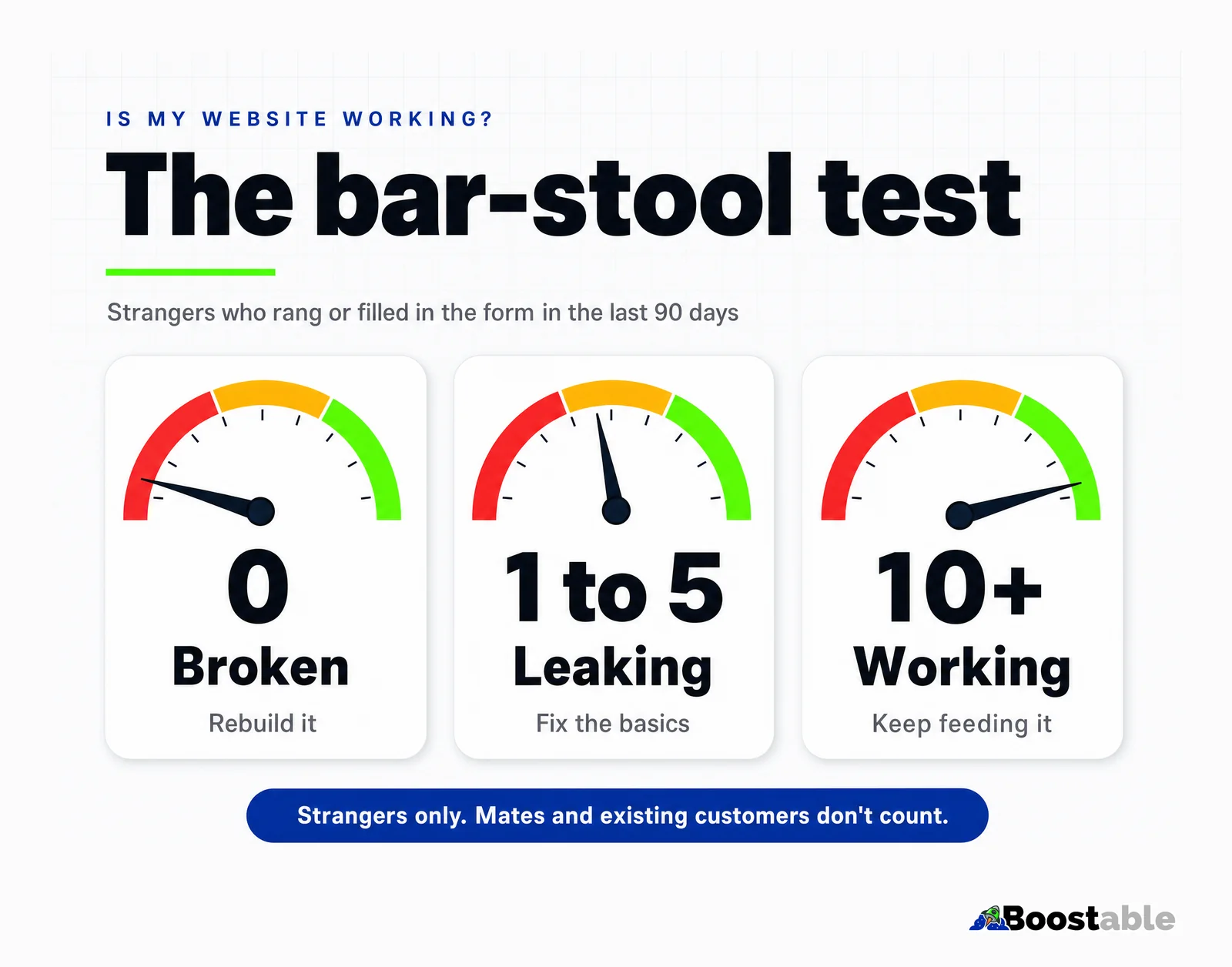
If the number's zero, the site's broken. If it's one or two, the site's leaking. If it's steady and climbing, you've got something real. That's the whole test, and it beats every vanity metric because it counts the only thing the site exists to produce.
Three things that look like leads and aren't. Traffic: a thousand visits a month with no calls is a thousand people who left. Your own visits, and your staff's, which most analytics setups count. And existing customers who Googled you to find the number they already had; they'd have rung anyway. Strip those out and the honest number is usually smaller than the owner thought, which is the point of the test. It's meant to sting a bit, because the sting is what gets the basics fixed.
| Stranger leads, last 90 days | Verdict | What it usually means |
|---|---|---|
| 0 | Broken | Nobody finds it, or they find it and can't work out what to do. Rebuild or overhaul. |
| 1 to 5 | Leaking | It's found sometimes, but it loses most visitors. Fix the basics, in order. |
| 10 or more, and climbing | Working | Keep feeding it: pages, reviews, photos. Don't redesign it. |
| Don't know | Untracked | Set up the counting first. You can't fix what you can't see. |
The five things a working site does
A website that works does five things. All five. Not three, not four. Take any of them out and the whole thing leaks, and you can have four out of five and still get nothing.
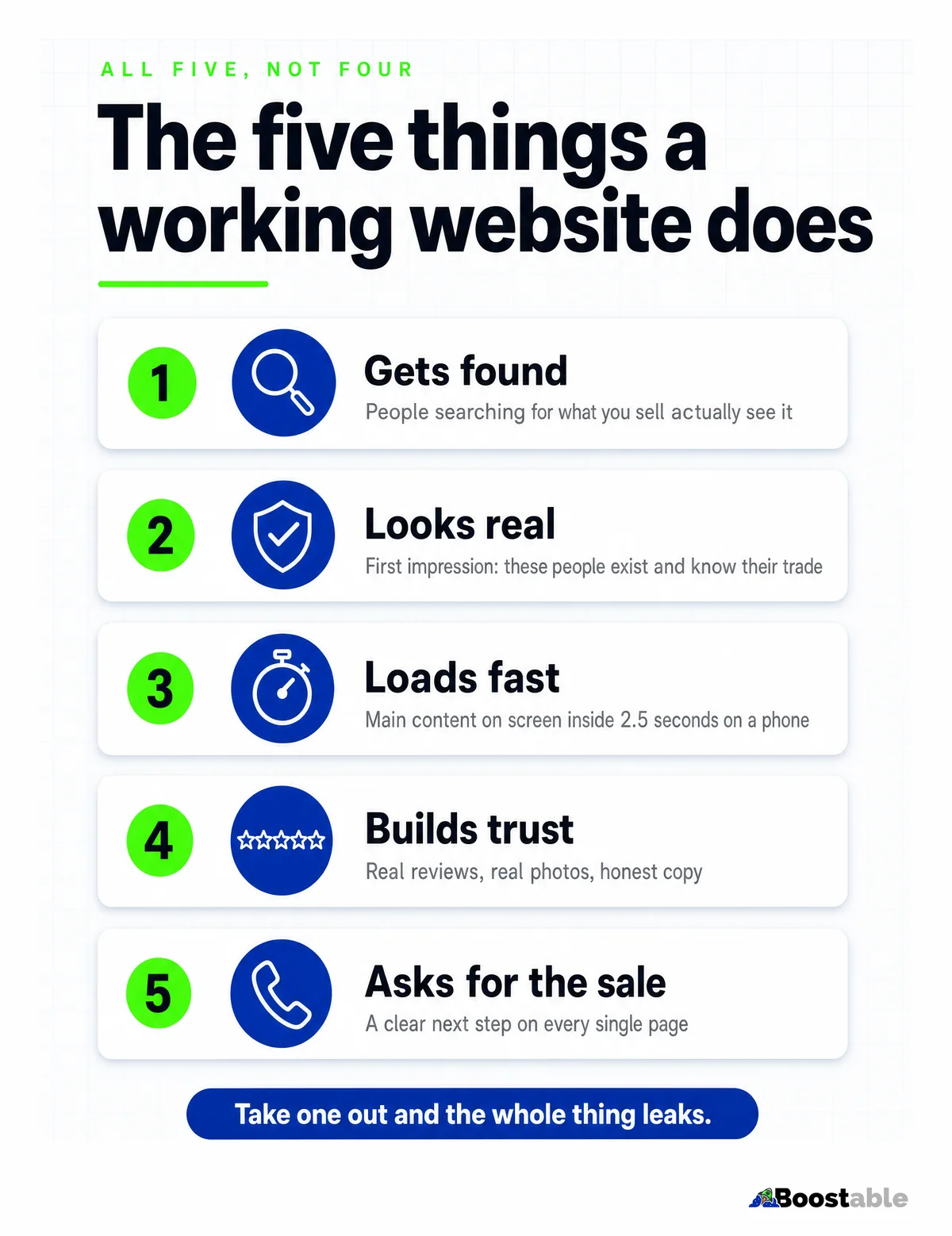
1. It gets found. People searching for what you sell actually see it. That means the pages use the words customers type, which is Google's own advice: "think about the words that a user might search for to find a piece of your content."[6] It also means the Google Business Profile is complete, because for a local business the map box is where the finding happens, and Google ranks that on "relevance, distance, and popularity."[5]
2. It looks like a real business. The first impression is "these people exist and know their trade." Real photos, real names, the actual van. Google's guidance on content asks whether it "clearly demonstrate[s] first-hand expertise,"[7] and a stock handshake demonstrates the opposite.
3. It loads fast. Google's Core Web Vitals say the main content should appear within 2.5 seconds, the page should respond to a tap within 200 milliseconds, and nothing should shift around as it loads.[1] On a phone, on mobile data. 97% of Australian adults go online on a mobile, and 91% of them do it multiple times a day,[2] so that's the device the test runs on.
4. It builds trust. Reviews, real photos, honest copy. 82% of adults read reviews before a first-time purchase.[8] If the Google rating and three real reviews aren't on the home page, the visitor goes looking for them somewhere else, and somewhere else has competitors on it.
5. It asks for the sale. A clear next step on every single page. Phone number at the top, a button at the bottom, a short form partway down. When the customer is ready, the door has to be open.
The five are in order of how often they're missing, not how much they matter. Speed and findability are the ones that stop everything else working, but the one we see failed most often is the last: a site that does the first four well and then never asks. Beautiful photos, real reviews, plain words, and the only way to make contact is a "Contact" link in the menu that leads to a form with nine fields. The visitor was ready. The site wasn't.
"We gave Tamhas the difficult job of making our site and creating a unique catalogue for the upgrades we offer. He did a fantastic job, is very professional and highly recommended. Thanks for a job well done!!"
Eric Fenollar ★★★★★ Verified Google review
Why so many sites fail the test
Nearly every small business site that isn't working fails the same handful of ways, in every industry. It's slow. It's hard to find on Google. The phone number is hidden in the footer. It was built for a desktop the customer never uses; Google itself now "uses the mobile version of a site's content, crawled with the smartphone agent, for indexing and ranking."[3] And it's full of buzzwords written by someone who's never done the job.
None of these are clever problems. They're all basic problems, which is good news, because basic problems have basic fixes.
There's a fourth failure that hides behind the other three: the site is fine, but nobody can find it because the Google Business Profile is empty. For a local business, most first contact happens in the map box, not on the website. If the profile has the wrong category, no services and no service areas, the best site in the state gets no visitors to fail with. Check the profile in the same sitting as the site. We wrote that check up in the Google Business Profile guide.
The questions to ask before you spend a dollar
Before fixing anything, ask three questions about the site you have. Who owns it? If the domain, the hosting and the login are in the designer's name, you can't fix it without them, and that changes what "fix" costs. Can it be edited? A site nobody can change without a developer will stay broken between invoices. And what's it built on? Some platforms can't be made fast no matter what you do to them, and the honest answer there is a rebuild on something that can. We put the full list in the questions to ask your web designer, and they apply just as well to the designer you already used.
What the web design crowd won't tell you
Most web designers are artists, not salespeople. They're trying to win design awards. They care about how the site looks in their portfolio, whether the typography feels right, whether the hero image pops. That's fine. But the customer doesn't care. The customer wants to know if you can fix their gate, paint their kitchen or inspect their house, and they want to know it in three seconds.
The best small business sites in Australia don't win design awards. They bring in leads every week without the owner thinking about them. A website is a hammer. It's meant to drive nails. If it's shiny but it doesn't drive nails, it's a bad hammer, no matter what the shop sold it as.
This is also why "we'll do a redesign" is usually the wrong answer to a leaking site. A redesign changes how the hammer looks. The leaks are speed, findability, the buried number, the missing reviews and the buzzwords, and a new design can carry every one of them across untouched. We've seen businesses pay for three redesigns in six years and never once fix the phone number. Fix the leaks first. If the site still fails the test after that, then talk about how it looks.
Trust is the cheapest of the five to fix. The card and the text that keep the reviews coming are free.
Get the free review systemHow to count the leads properly
The bar-stool test works on memory and a phone log. To stop guessing, make the site count for you. Make the phone number a tappable link and the contact form a real form, then tell Google Analytics that a tap and a form submission are the things that matter. Google's term is a key event: "an event that measures an action that's particularly important to the success of your business," which is then "surfaced in your Google Analytics reports."[4]
Once calls and forms are key events, you can see which pages and which Google searches produce them, and the 90-day number comes off a report instead of a guess. It's an hour's setup. Every site we build has it from day one, because a site that can't count its own leads can't be judged, and a site that can't be judged never gets fixed.
Two habits make the counting honest. First, ask every new caller how they found you and write it down; the analytics catch the taps, the question catches the people who read the number off the screen and dialled by hand. Second, run the test on the same day each quarter. The number moving is the story: a site going from two to eight to fourteen stranger leads over three quarters is working, whatever it looks like. A site stuck on three while you spend on it is not.
What it looks like when a leaking site gets fixed
Take a painter in Geelong with a site that fails the test. The home page opens on a slideshow of other people's houses. The number is in the footer. The services page says "quality workmanship" and nothing about interiors, exteriors, heritage or commercial. There's no page for Torquay or Ocean Grove, where half the work is. Two stranger enquiries in ninety days, both by form, both asking what suburbs he covers.
The fix isn't a redesign. Speed first: the slideshow goes, and the page loads in under two seconds. The number moves to the top and becomes tappable. The services page becomes four pages, one per kind of job, in the words people search. A page each for the six coastal towns, with a job he did in each. His Google rating and three reviews on the home page. Calls and forms marked as key events. None of that needed a new logo, and all of it was the difference between a site that existed and a site that worked. The next quarter's number is the only review that matters.
What to check, in order
If the site isn't pulling its weight, run down this list. In order. Fix the first thing before you touch the second, because the later fixes are wasted on a site nobody can load.
Speed
Test it on a phone, on mobile data. Main content up inside 2.5 seconds[1] or nothing else matters.
Phone number at the top
Not in the footer, not behind a menu. Top of every page, tappable.
A next step on every page
A button, a form, a number. Obvious, contrasting colour, not optional.
Local pages
One page for each town or suburb you serve, saying what you do there.
That's the short list. It's not glamorous. It works, and most of it is an afternoon each. Do the first three this week and you'll usually see the phone move before you've touched the rest, because the visitors were already there; they just couldn't find the door.
✗ The trophy
- Opens on a full-screen animation and a slogan
- Phone number in the footer, in grey
- "Solutions", "passionate", "industry-leading"
- Stock photos of people who don't work there
- Nobody knows how many leads it got last month
✓ The tool
- Opens on what you do and where, in one line
- Tappable number at the top of every page
- The words a customer types into Google
- Photos of the actual van, the actual team, the actual work
- Calls and forms counted, every week, in one report
"Our experience was great. Tamhas and his team were responsive, helpful and worked with us every step of the way to create exactly what we needed."
Lindsay Spears ★★★★★ Verified Google review
What to do next
If your site fails the bar-stool test, don't panic. It's fixable, and most of the time the repair is cheaper than the original build, because you're not starting over. You're plugging the leaks.
- Count the strangers from the last 90 days. Phone log, inbox, form submissions. Write the number down.
- Open the site on your phone, on mobile data. Time the first screen. Note anything you have to pinch to read.
- Find the phone number. If it took more than a second, move it to the top of every page and make it tappable.
- Put your Google rating and three real reviews on the home page.
- Mark phone taps and form submissions as key events in Google Analytics, so next quarter's number comes off a report.
Run the test today, write the number on a sticky note, and run it again in ninety days. Stop admiring your website and start measuring it. Count the calls, count the forms, and count them again next quarter. That's the only number that matters, and if you'd rather someone else made it climb, that's what our web design service does.