
Local SEO Checklist for Australian Small Business: Ten Things, in the Order That Pays
A local SEO checklist for Australian small business, in priority order. Ten free things, from verifying the profile to a page per suburb, each with Google's own rule behind it and a note on what it moves. Most of your competitors have done three of them.

By Boostable · 13 September 2026
Websites and SEO for Australian businesses · ~11 min read


Most Australian small businesses can't rank on Google for the same handful of reasons, and they're not the reasons the SEO industry usually sells. They're simple, fixable, and free. This local SEO checklist puts them in the order that moves rankings fastest: what to do first, what to do second, what to do tenth. Every item carries the Google rule behind it, so you can see it isn't our opinion.
Ten items. All of them are things Google has said, in its own help pages, that it reads. With 97.3% of Australian businesses being small businesses,[11] the competitors in your map box are mostly businesses like yours, and most of them have done about three of these. That's the opportunity.
- Local SEO with Boostable: the checklist done and kept up, month to month.
- Local SEO for small business: how to actually get on page one
- Google Business Profile optimisation: the complete guide
- Why your business isn't showing on Google Maps
Why the order matters
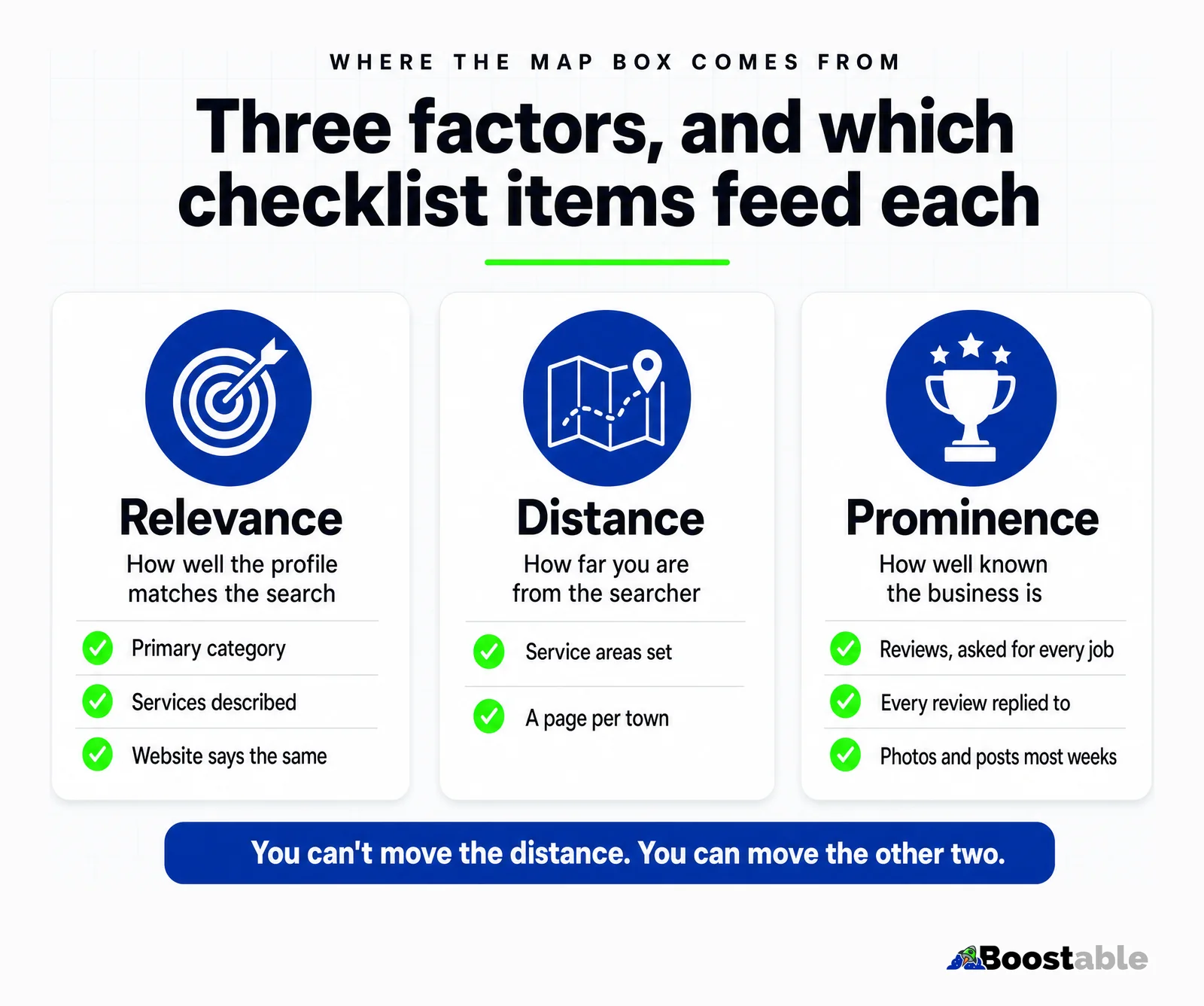
Google says local results are "mainly based on relevance, distance, and popularity,"[1] and it names the third factor prominence: "how well-known a business is," fed partly by "how many reviews you have."[1] You can't change your distance from the searcher. Everything on this list moves relevance or prominence, and the first four decide whether you're eligible for a search at all. Do those first, because reviews and pages have nothing to lift until Google knows what you do and where.
The other reason for the order is cost. The first six items are minutes each and free; the last four take hours and, for the pages, real writing. Doing the cheap ones first means the profile is already moving while the pages are being built, and the reviews that come in during that month are the raw material for the suburb pages when you get to them.
How to check where you are
Before touching anything, run three searches on your phone, standing somewhere in your area: your main service and your town, your main service and "near me", and your business name. Write down who's in the map box for the first two and how many reviews they have. That's your benchmark. Then open your own profile as the owner and count the empty fields. Most businesses doing this for the first time score three or four out of ten, and the gaps are almost always the same: no verification or an old one, a broad category, empty services, no service areas, and reviews that stopped a year ago.
Come back to the same three searches at the end of each month. The map box moving is the only scoreboard that matters, and it's free to read.
The checklist
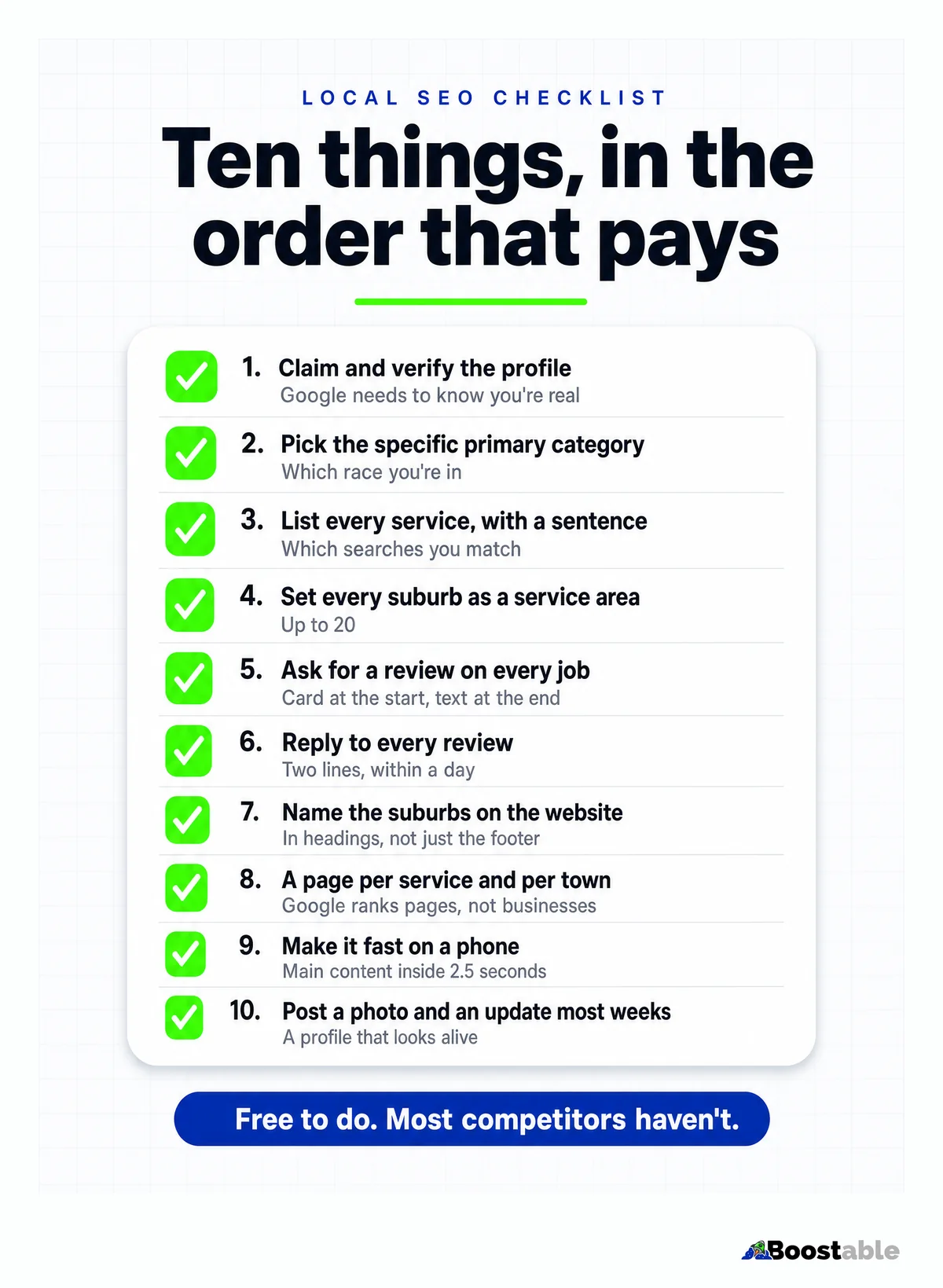
1. Claim and verify the Google Business Profile. Nothing else works until this is done. Google says verification "tells Google that you're authorized to represent the business, so it's more likely to show up in search results,"[1] and you can't edit the profile or reply to reviews without it. Free to claim; usually a video or a postcard to verify.
2. Pick the most specific primary category. This decides which race you're in. Google's guidelines say to "use as few categories as possible to describe your overall core business" and to "choose categories that are as specific as possible, but representative."[2] A tree service listed as "Landscaper" competes with landscapers. Add secondaries only for things you genuinely do.
3. List every service, with a sentence each. If you never listed "stump grinding", you're not in the running for "stump grinding near me". Google's advice is to "provide complete and detailed business info" so it can "match it to relevant searches,"[1] and the services fields, with a plain description under each, are the most direct way to do that.
4. Set every suburb and town as a service area. Up to 20, within about two hours' drive, and if you don't serve customers at your address, Google says to remove the address and show service areas instead.[3] One service area means Google shows you in one place.
5. Ask for a review on every job. Now the profile can be lifted, lift it. A card with a QR code at the start of the job, a text with the direct link at the end. Google's suggestion is to "ask customers to visit a Google link or scan a QR code,"[4] and its ranking page says "more reviews and positive ratings can help your business's local ranking."[1] Never pay for one; Google prohibits incentives.[4]
6. Reply to every review. Two lines, by name, within a day. Google lists replying among its local ranking tips: "when you reply to customer reviews, it shows that you value their feedback."[1] Its reply tips say keep it short, personalise it and be prompt.[4]
7. Name the suburbs on the website, in headings. Google cross-checks the profile against the site. Its ranking explainer says the most basic relevance signal is when a page "contains the same keywords as your search query," particularly "in the headings or body text."[5] The same towns, spelled the same way, on both.
8. A page per service, and a page per town that matters. Google ranks pages, not businesses. A plumber serving thirty suburbs with one page ranks for one town. A page per suburb, each with something true about working there, is thirty pages Google can match to thirty searches. Start with the nearest and busiest.
9. Make it fast on a phone. Google "uses the mobile version of a site's content, crawled with the smartphone agent, for indexing and ranking,"[7] and its Core Web Vitals say the main content should appear within 2.5 seconds, the page should respond to a tap within 200 milliseconds, and nothing should jump as it loads.[6] Test on mobile data, not office wifi.
Item 8 is where the writing happens, and it's the one people put off. The shortcut is an interview: forty minutes talking through what you do, how you do it well, what goes wrong when it's done cheaply and what you do so it doesn't, town by town. Every answer is a paragraph. A suburb page built from that is four or five hundred honest words with a job you did there and a photo; a suburb page built by swapping the town name in a template is the kind Google's guidance warns about, and it can tell the difference.
10. Post a photo and an update most weeks. A profile that looks alive. Google's posts appear on Search and Maps and are archived after six months unless they carry a date range,[9] so it's a steady drip, not a one-off. A finished job and three sentences is plenty.
| # | Item | Moves | Time to do |
|---|---|---|---|
| 1 | Verify the profile[1] | Eligibility | Minutes, plus waiting for Google |
| 2 | Specific primary category[2] | Relevance | Ten minutes |
| 3 | Every service, with a sentence | Relevance | An hour |
| 4 | Every suburb as a service area[3] | Where you show | Ten minutes |
| 5 | A review on every job[4] | Prominence | Thirty seconds a job, forever |
| 6 | Reply to every review[1] | Prominence, trust | Thirty seconds a review |
| 7 | Suburbs on the site, in headings[5] | Relevance | An afternoon |
| 8 | A page per service and per town | Relevance, reach | A page a week |
| 9 | Fast on a phone[6] | Everything else working | Depends on the site |
| 10 | A photo and a post most weeks[9] | Prominence, freshness | Ten minutes a week |
"Tamhas designed our website and did seo for us and has provided us with so much work and quality leads. We are so grateful for the work Tamhas did. He has been a massive help in building our business. I would highly recommend"
Joelene Paterson ★★★★★ Verified Google review
The one most businesses skip: reviews
Items 5 and 6 are the ones we see skipped most, and they're the cheapest. The typical profile we audit has ten to thirty reviews collected over years, while the business at the top of the same map box has hundreds. Northwestern's Spiegel Research Center found purchase likelihood with five reviews is 270% higher than with none, and that it peaks between 4.0 and 4.7 stars,[10] so a steady stream of honest reviews beats a handful of perfect ones.
The system is a card and a text. Handed over at the start of the job, sent within the hour of finishing, asking for a mention of the suburb and the job. We set it up free for any business that wants it, and it's the item on this list that starts paying inside the first week.
Reviews also do a job the profile fields can't. When a customer writes "they took the dead gum out of our yard in Wyndham Vale on Saturday", they've named the service and the suburb in one sentence, in words Google matches to searches.[5] Prompt for that: the text that carries the link can ask them to mention where they are and what you did. Not a script, a hint.
Items 5 and 6 run on a card and a text. We'll set both up for your business for free.
Get the free review systemThe tidy-up items, after the ten
There's a third tidy-up that isn't a tidy-up: the phone number. It should be tappable on every page, with the spaces in the visible number and none in the link behind it. A checklist that gets you found and then loses the caller at the last tap has wasted the other nine items. Then, two things the industry sells as the main event that are really tidy-ups. Structured data (schema) on the website tells Google, in a machine-readable way, your hours, address and business type. Google's documentation says Search "may display a prominent Google knowledge panel" or a carousel of businesses from that data, and in the same breath that it "does not guarantee that features that consume structured data will show up."[8] Worth doing once the pages exist; not a substitute for them.
AI search reads the same things this checklist produces. When someone asks an assistant for a good electrician in Werribee, the answer is built from profiles and pages that say, plainly, that this business does electrical work in Werribee, with reviews that agree. There's no separate trick. A business that has done the ten items is the one an assistant can find; a business that hasn't gives it nothing to quote.
✓ The checklist, kept up
- Review system in on day one; reviews landing in week one
- Every field on the profile: category, services, suburbs
- A real page per suburb, with real local detail
- Reports that count calls and forms from strangers
- Month to month, everything in your name
✗ The typical retainer
- A twelve-month contract before any result
- Profile "optimised" once, then never touched
- One generic services page for thirty suburbs
- A PDF of impressions and "domain authority"
- The profile and the site in the agency's accounts
"I run a small service business. I was not doing well on google. While looking at someone else's website who ranked really high, i found Boostable Web Design & Digital Marketing's logo at the bottom of the page.. so i called Tamhas. From my initial phone call, it was obvious he had full knowledge of local SEO. He was & still is so helpful. He's energetic and is as keen as i am at getting results. The first day i was verified on GMB after he tampered with it, i got a call from a customer that turned into a job the same day. Boostable is well worth the money."
Joely boy ★★★★★ Verified Google review
What it looks like when the list is done
A building inspector in Melbourne's west, Star Building Inspections, is the worked example we point people to. The profile filled, the reviews asked for on every inspection, a page for every suburb the inspector covers, articles answering the questions buyers actually ask. Between April and August 2026 clicks from Google went from 47 a month to 222 and impressions from 11,339 to 31,224, straight out of Search Console, and the reviews passed 150. None of the ten items on this list was skipped, and none of them was clever. The full story with the chart is on its own page.
The pattern repeats across trades because the list doesn't care what the trade is. A cleaner in Wangaratta, a stump grinder in Wollongong, a fridge mechanic in Sydney: same profile fields, same card and text, same suburb pages. The businesses that get there are the ones that did all ten and kept going, not the ones that found a trick.
Your thirty-day order
Do the list in four weeks. Week one is the profile; week two is the reviews; week three is the website; week four is the first pages. After that it's maintenance: a review on every job, a reply to every review, a post most weeks, a new page when you add a service or a town.
- Week one. Verify the profile. Fix the primary category. List every service with a sentence. Set every suburb as a service area. Rewrite the description to say what, for whom, where.
- Week two. Get the review card made and the text template saved. Ask on every job from now on. Reply to every review you've ever had, oldest first.
- Week three. Open the site on a phone on mobile data and fix whatever's slow. Put the suburbs in headings. Put the number at the top of every page.
- Week four. Build the first two pages: your busiest service, and your nearest suburb. Real detail, a real photo, the same words as the profile.
- Every week after. One post with a photo. One new page when there's something to add. Count the calls.
The quiet truth
Nothing on this list can be bought; Google says "there's no way to request or pay for a better local ranking."[1] It can only be done, and most of your competitors haven't done it. Do all ten, keep them up, and the map box is yours to lose. Print the list, stick it on the office wall, and tick them off; it's the cheapest marketing plan a small business will ever run. If you'd rather we did the doing, that's what our local SEO service is, and the Star Building Inspections story is what the list looks like with the numbers attached.


